

Introduction: The Enduring Legacy of the Click Wheel
In the fast-paced world of technology, where Apple Vision Pro news and the latest iPhone news dominate the headlines, there remains a quiet, steadfast longing for a simpler era of consumer electronics. For many, the pinnacle of personal audio was not a streaming service or a voice-activated smart speaker, but a dedicated device with a mechanical hard drive and a tactile scroll wheel: the iPod Classic. While Apple officially retired the iPod line, concluding with the iPod Touch news of its discontinuation, the spirit of the dedicated music player is far from dead. In fact, it is experiencing a renaissance driven by the maker community, open-source engineering, and a desire for digital minimalism.
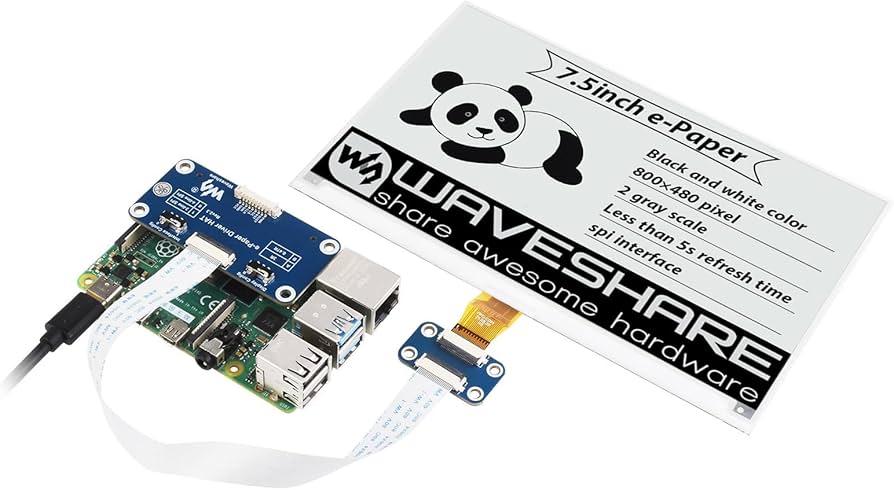
Recent innovations in the DIY electronics space have birthed a new genre of devices: modern interpretations of the iPod Classic built from the ground up using components like the Raspberry Pi Zero 2 W and ePaper displays. These projects are not merely nostalgic tributes; they are sophisticated engineering feats that combine the aesthetic of the early 2000s with modern connectivity and battery efficiency. This article delves deep into this growing trend, exploring the technical architecture of these “modern classics,” the philosophy behind ePaper interfaces, and why, in an era of Apple ecosystem news saturation, users are flocking back to offline music.
Section 1: The Architecture of a Modern DIY Music Player
To understand why these projects are gaining traction, we must look under the hood. Unlike the original iPods, which relied on proprietary firmware and specialized portal player chips, modern recreations utilize accessible, high-power microcomputers. The heart of many of these builds is the Raspberry Pi Zero 2 W. This component is a game-changer for iPod revival news because it offers a quad-core processor and Wi-Fi/Bluetooth connectivity in a form factor small enough to fit inside a pocketable casing.
The Brain: Raspberry Pi Zero 2 W
The choice of the Raspberry Pi Zero 2 W is strategic. It runs a full Linux operating system, allowing for immense flexibility in software. Makers can write custom Python scripts to handle music playback, interface with buttons, and manage power consumption. Unlike the microcontroller-based operating systems of the past, a Linux-based music player can support modern file formats (FLAC, ALAC, OGG) without breaking a sweat. Furthermore, the inclusion of Wi-Fi means these devices can technically sync wirelessly—a feature that bridges the gap between the wired iPod Classic news of yesteryear and modern iOS updates news.
The Face: ePaper Technology
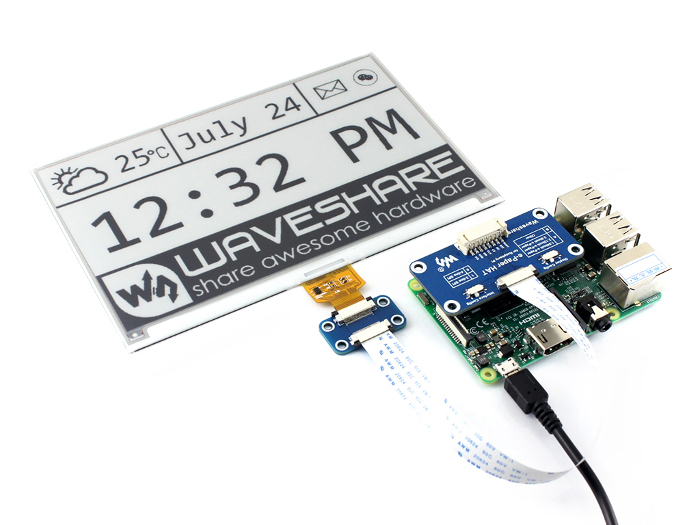
Perhaps the most striking divergence from the original iPod design in these modern builds is the use of ePaper (or E Ink) displays. While iPad news and iPhone news focus on OLED screens with high refresh rates and deep blacks, the DIY audio community is embracing the slow, monochrome aesthetic of electronic paper.
There are several technical and aesthetic reasons for this:
- Battery Efficiency: ePaper only consumes power when the image changes. Once the song title and album art are rendered, the screen draws zero current. This allows for extended playback times, mimicking the legendary battery life of the original iPod Nano news cycles.
- Sunlight Readability: Unlike the glossy screens of an iPod Touch or an iPhone, ePaper is perfectly readable in direct sunlight, making it ideal for outdoor use.
- Aesthetic Minimalism: The matte, paper-like quality of the display contributes to a “calm” technology experience, free from the blue light and glare associated with Apple Watch news or smartphone screens.
The Interface: Recreating the Click Wheel
The defining feature of the iPod was the Click Wheel. Replicating this experience is the “holy grail” for makers. While some projects utilize capacitive touch sensors arranged in a circle, others scavenge parts from broken devices. The challenge lies in the software interpretation of the input. Coding a Python script to interpret the velocity and direction of a thumb swirl to control volume or scroll through a list is a complex task that requires fine-tuning to match the “feel” that Apple perfected years ago.
Section 2: Software, Audio Quality, and the Ecosystem
Building the hardware is only half the battle. The software stack determines the user experience. In the realm of Apple ecosystem news, integration is seamless. For a DIY device, the maker must build that ecosystem from scratch.
Operating Systems and Audio Daemons
Most of these Raspberry Pi-powered players run a stripped-down version of Linux. The audio playback is often handled by lightweight daemons like MPD (Music Player Daemon) or Mopidy. These allow for gapless playback and playlist management. The user interface (UI) is usually custom-written in Python using libraries compatible with ePaper refresh rates. The challenge here is latency; ePaper has a slow refresh rate, so the UI must be designed to minimize animations. It’s a stark contrast to the fluid interfaces discussed in Apple Vision Pro news or iPad vision board news, but it forces a utilitarian design philosophy that many users find refreshing.
High-Resolution Audio and DACs
One area where these DIY builds often surpass the original hardware is in audio quality. The Raspberry Pi can output digital audio to a dedicated DAC (Digital-to-Analog Converter) HAT (Hardware Attached on Top). This allows for audiophile-grade sound that rivals expensive dedicated digital audio players (DAPs). While AirPods news and AirPods Pro news focus on the convenience of wireless compression and spatial audio, the DIY crowd is often chasing the purity of uncompressed, wired audio.
However, modern connectivity is not ignored. Thanks to the Pi Zero 2 W’s Bluetooth capabilities, users can connect AirPods Max or other wireless headphones. This creates a fascinating hybrid device: a retro-styled player with an ePaper screen, streaming high-bitrate audio to modern noise-canceling headphones.
Syncing and File Management
In the age of Apple privacy news and cloud streaming, owning your data is a significant motivator. These devices do not rely on Apple Music or Spotify. Users must curate their own libraries of MP3s or FLACs. Syncing is often done via SFTP (Secure File Transfer Protocol) over Wi-Fi or by physically loading an SD card. It’s a deliberate friction that encourages users to be more selective and appreciative of their music library, reminiscent of the days of iPod Shuffle news where storage limitations dictated listening habits.
Section 3: The Philosophy of Digital Minimalism
Why go through the trouble of building a music player when you have an iPhone? The answer lies in the psychological impact of our devices. Apple health news increasingly covers the importance of mental well-being and reducing screen time. A DIY iPod offers a sanctuary from the attention economy.
Escaping the Notification Trap
When you listen to music on an iPhone, you are constantly bombarded by interruptions: Siri news updates, email notifications, social media pings, and AirTag news alerts. A dedicated player has one function: to play music. It does not track your location, it does not serve ads, and it does not interrupt your favorite song with a breaking news alert. This “singletasking” capability is becoming a luxury commodity.
Tactile Satisfaction in a Touchscreen World
There is a growing fatigue regarding touchscreens. Apple Pencil news and Apple Pencil Vision Pro news highlight the desire for more precise input methods, but nothing quite matches the satisfaction of a physical button or a mechanical wheel. The DIY iPod projects often emphasize tactile switches and heavy, 3D-printed cases that feel substantial in the hand. It creates a physical connection to the music that a glass slab cannot replicate.
Case Study: The Maker’s Journey
Consider the workflow of a typical enthusiast building one of these devices. They might start by designing a case using CAD software on an iPad, perhaps catching up on iPad news regarding 3D modeling apps. They use an Apple Pencil to sketch the wiring diagram. They print the case, solder the GPIO pins on the Raspberry Pi, and assemble the ePaper screen. The result is a device that is uniquely theirs. It’s a stark contrast to buying a mass-produced item like a HomePod mini. The emotional investment in the device enhances the listening experience.
Section 4: Challenges, Pitfalls, and Future Implications
While the prospect of building a custom iPod is exciting, it is fraught with technical challenges. It is not as simple as waiting for the next iOS security news update; you are the support team.
Power Management Struggles
The Raspberry Pi, even the Zero variant, is not as power-efficient as the dedicated ARM chips used in the original iPod Mini news era. Managing battery life is the hardest part of these builds. Makers must implement safe shutdown scripts to prevent SD card corruption and use LiPo shim boards to manage charging. Without careful optimization, the device might only last a few hours, whereas an original iPod Classic could last days. This is a significant trade-off compared to the efficiency seen in Apple Watch news or AirPods news.
The Cost of DIY
Ironically, building a “cheap” music player can be expensive. By the time you purchase the Pi, the ePaper display, a high-quality DAC, a battery, and 3D printing materials, the cost can approach that of a used iPhone or a new HomePod. The value proposition is not financial; it is experiential.
The Future of Retro-Tech
This trend signals a potential market shift. We are seeing similar movements in other areas, such as the interest in Vision Pro accessories news that mimic retro aesthetics, or the “dumbphone” movement. Could Apple ever release a “Classic” edition? Unlikely, given their focus on services and Apple TV marketing news. However, the persistence of these projects suggests that the form factor of the iPod is timeless. We might see third-party manufacturers (outside of the DIY space) releasing polished, consumer-ready devices that utilize ePaper and streaming integration, bridging the gap between the iPod revival news enthusiasts and the general public.
Integration with Modern Apple Gear
For those deeply entrenched in the ecosystem, these devices present a hurdle. They don’t support AirPlay 2 (unlike Apple TV news or HomePod news devices). They don’t have the H1/H2 chips for instant pairing found in AirPods Pro news. However, the open-source nature means that workarounds are always being developed. Some enterprising developers are working on “Shairport Sync” implementations to turn these portable players into AirPlay receivers, or writing scripts to sync playlists from Apple Music (via API) to the local storage.
Conclusion
The emergence of Raspberry Pi-powered, ePaper-equipped music players is more than just a hobbyist fad; it is a statement on the current state of consumer technology. In a world obsessed with the futuristic promises of Apple Vision Pro news and Apple AR news, there is a grounding comfort in the past. These devices, inspired by the iPod Classic news of a bygone era, offer a blend of nostalgia and modern engineering that appeals to our desire for focus, tactile control, and high-quality audio.
While they may never replace the convenience of an iPhone or the seamlessness of the Apple ecosystem, they serve as a reminder that technology should serve the user, not the other way around. Whether you are a die-hard audiophile, a coding enthusiast, or someone simply looking to disconnect, the “ePiPod” concept represents a beautiful marriage of the old and the new. As we look forward to future iOS updates news and hardware releases, let us not forget the simple joy of a scroll wheel, a headphone jack, and a library of songs in our pocket.