
The decision between Apple Pencil Pro ($129) and Apple Pencil USB-C ($79) for the iPad mini 7 looks like a $50 question about barrel roll. It is not. The real divide is pressure sensitivity, which the USB-C pencil silently lacks. Pure annotators marking up PDFs are fine on USB-C. Anyone taking handwritten notes or sketching needs the Pro — pressure-driven ink weight is what makes those workflows feel like writing instead of dragging a flat-line marker.
- Apple Pencil Pro is $129; Apple Pencil USB-C is $79 — a $50 delta on iPad mini 7.
- Both pencils work with iPad mini (A17 Pro), and both support hover on this model.
- USB-C lacks pressure sensitivity, double-tap, barrel roll, squeeze, haptic feedback, Find My, and wireless charging.
- Decision rubric: PDF markup → USB-C; handwritten notes or illustration → Pro.
- USB-C’s magnetic attach on iPad mini 7 is for storage only — no inductive charge, no pairing.
The 30-second answer for iPad mini 7 buyers
Three buckets, decided in one sentence each. If you bought the iPad mini 7 mainly to mark up PDFs, sign documents, or scribble the occasional comment in Mail, the $79 Apple Pencil USB-C is enough — you will not miss what you never use. If you write handwritten notes in GoodNotes, Notability, or Apple Notes, buy the Pro; the cheaper pencil’s flat-line strokes turn handwriting into a uniform marker trail. If you sketch or illustrate at all — even casually in Procreate or Freeform — buy the Pro, because pressure sensitivity is what separates a stylus from a digital pen, and it is the headline absence on USB-C that Apple’s compatibility page lists as one bullet among many.
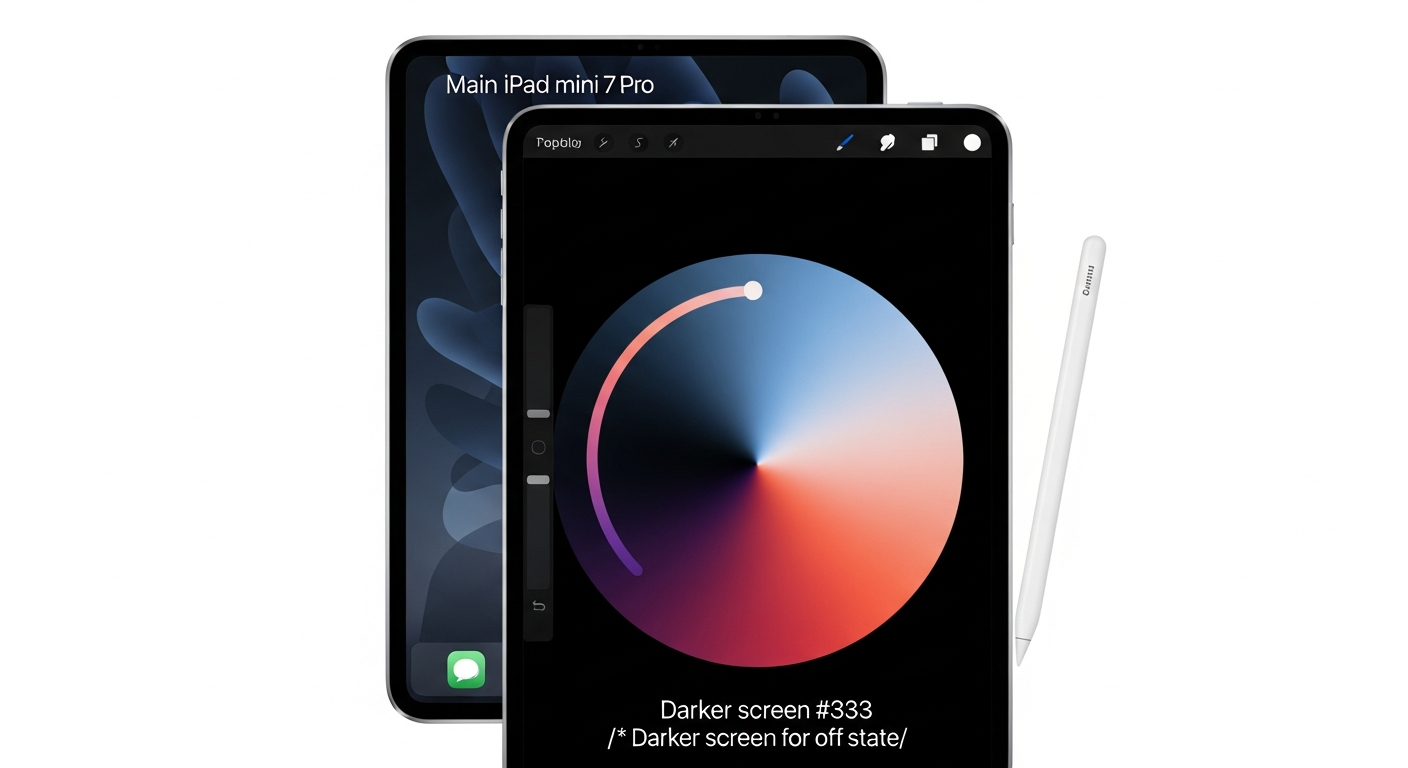
The diagram above places the same iPad mini 7 paired with both pencils side by side, with each pencil’s supported features called out. The visual gap is the argument the rest of this piece defends: USB-C’s checklist looks short on paper, but the absent items touch every stroke a note-taker or illustrator makes. Tilt and hover survive. Pressure does not.
Background on this in M5 iPad Pro context.
Why pressure sensitivity, not barrel roll, is the real dividing line on iPad mini 7
Apple’s marketing leads with barrel roll because it is new in 2024 and unique to the Pro. That is fair as a marketing choice and misleading as a buying signal. Barrel roll only works in apps that have wired up the per-tool API, and even where it works it changes the angle of an already-pressure-driven brush. On a $79 pencil with no pressure sensitivity at all, brush angle is meaningless because every stroke comes out at one weight. Pressure is the prerequisite; barrel roll is a refinement on top of it.
The practical consequence on iPad mini 7 is sharper than the spec sheet suggests. In Procreate, brush opacity ramps and dynamic ink sizing key entirely off pencil pressure — with USB-C, every brush behaves like a felt-tip marker at full opacity. In GoodNotes 6 and Notability, handwritten notes lose the natural thinning at stroke ends that makes ink feel like ink; the result reads more like Sharpie than fountain pen. In Apple Notes, the calligraphy and fountain-pen tools are designed around pressure response and degrade visibly without it. None of this shows up on a feature checklist as a workflow break — Apple’s Apple Pencil compatibility page simply lists “pressure sensitivity — not supported” against the USB-C pencil and moves on.
More detail in what Pencil Pro actually unlocks.
Hover, by contrast, does survive on USB-C with iPad mini 7. Both pencils support hover on the A17 Pro mini, a fact widely misunderstood in older comparison content written before Apple updated the matrix. If you wanted hover for cursor tracking or for previewing where a stroke will land, you do not need to spend the extra $50.
Feature-by-feature on iPad mini 7: what each missing capability actually breaks
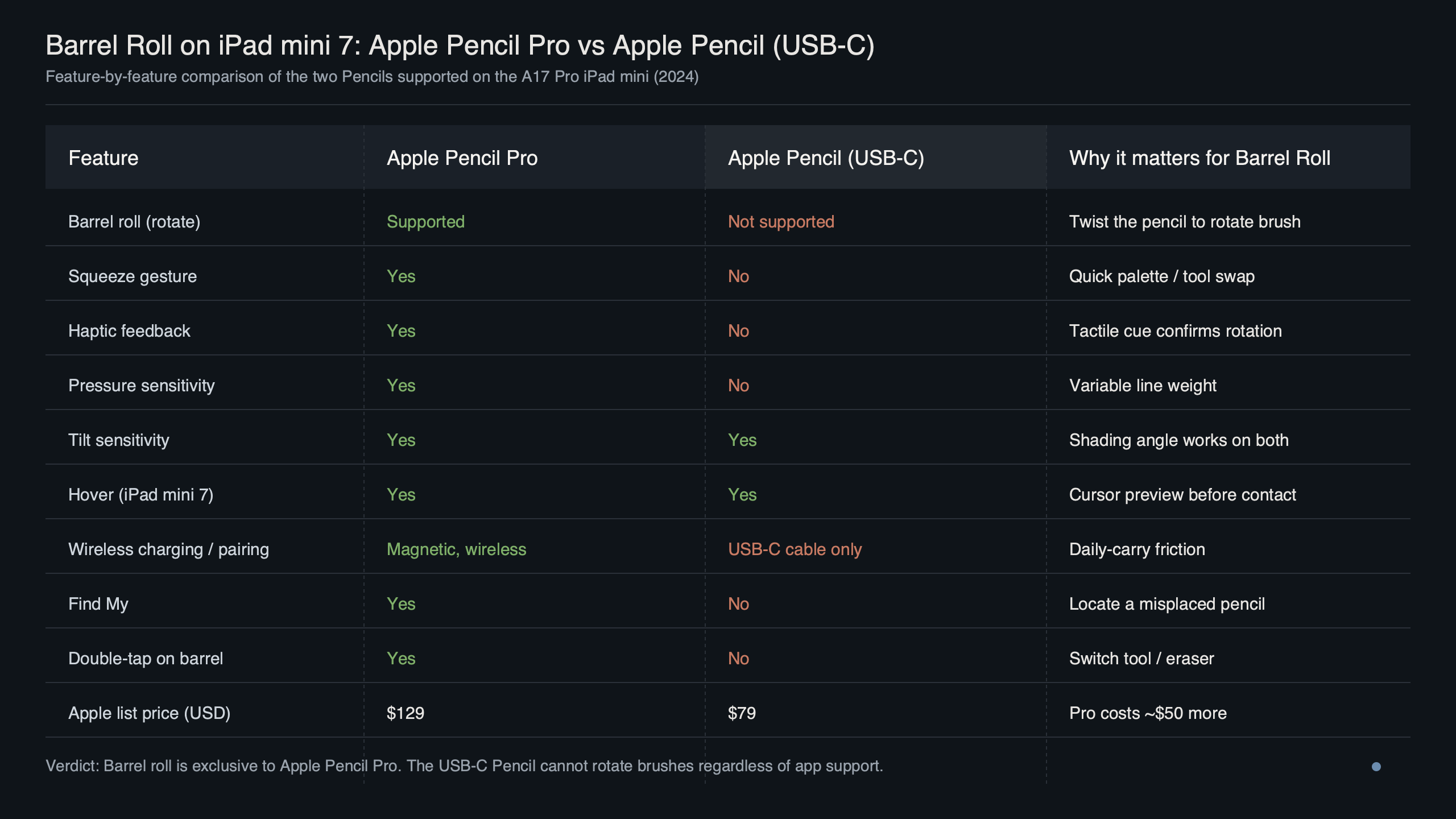
The table below maps every Pencil capability to its support status on each model — and adds the column Apple’s page does not have, which is the workflow each absence actually breaks on the iPad mini 7. Source rows: Apple’s Apple Pencil (USB-C) tech specs and Apple Pencil Pro tech specs, both checked April 2026.
| Feature | Pencil Pro | Pencil USB-C | What’s broken without it on mini 7 |
|---|---|---|---|
| Pressure sensitivity | Yes | No | Procreate brush opacity ramps go flat; GoodNotes/Notability handwriting loses ink-weight variation; Apple Notes fountain pen reduced to flat-line marker |
| Tilt sensitivity | Yes | Yes | Supported on both — pencil shading still works |
| Hover (on iPad mini A17 Pro) | Yes | Yes | Supported on both — preview where the stroke lands |
| Double-tap to switch tools | Yes | No | Have to tap the toolbar every pen↔eraser swap, slowing note-taking and editing |
| Squeeze gesture | Yes | No | No quick palette in Procreate, GoodNotes, Apple Notes, Pages, Keynote |
| Barrel roll | Yes | No | No brush rotation in Procreate calligraphy / GoodNotes Dynamic Ink — but only matters if you’d use it |
| Haptic feedback | Yes | No | No tactile confirmation of squeeze/double-tap; the gestures still fire, but feel guessy |
| Find My | Yes | No | Lost pencil = lost pencil; on the most portable iPad in the lineup, this is the highest-stakes absence |
| Wireless inductive charging | Yes (magnetic side) | No | USB-C cable required; the pencil’s own port flips open |
| Magnetic attach | Pairs + charges | Storage only | USB-C clings to the side but does not pair or charge from contact |
| Low latency | Yes | Yes | Supported on both |
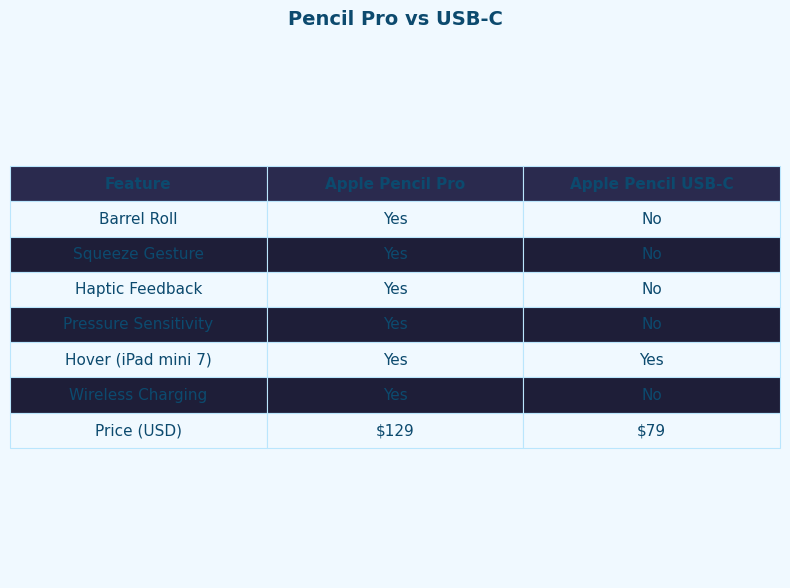
The comparison view above places the two pencils alongside the same mini 7 chassis. The takeaway is not the count of missing checkmarks but their distribution: USB-C drops every gesture that affects how a stroke is interpreted (pressure, double-tap, squeeze, barrel roll) plus every quality-of-life feature (haptics, Find My, wireless charging). What survives is the geometry of where the tip touches glass — useful for annotation, thin for anything else.
If you need more context, how the Pencil grew into a 3D tool covers the same ground.
Barrel roll is an app-API feature: which iPad mini 7 apps actually support it in 2026
This is where Apple’s checklist hides the truth. Barrel roll is not a system-level capability that just works in any drawing tool — it is a per-app integration that developers have to opt into and design around. The right question for an iPad mini 7 buyer is not “does the Pro support barrel roll?” but “does the app I use support it, and would I notice if it didn’t?” Adoption is uneven, and the gap matters because barrel roll is the marketing center of the Pro pitch.
Procreate has had barrel roll wired into shaped brushes since the Pro shipped in 2024 — rotating the pencil rotates the brush nib in real time, which is the demo Apple uses on stage. Apple Notes, Pages, Keynote, and Freeform all gained barrel roll through Apple’s first-party rollout, mostly in tools where the brush has a non-circular shape (calligraphy pen, highlighter). GoodNotes 6 added Dynamic Ink alongside its Apple Pencil Pro feature rollout, where its Fountain Pen responds to pencil rotation for ink-flow variation. Concepts and other vector tools have followed selectively. Notability has been slower; its toolset is more pen-as-pen and less brush-as-shape, so barrel roll has limited utility there even when surfaced.
For more on this, see barrel roll and squeeze in practice.
The honest read for the iPad mini 7 specifically: on an 8.3-inch canvas, barrel roll is most felt in detailed lettering or calligraphy work where you might rotate the pencil for a single character flourish. For continuous illustration on a small canvas, you reach for zoom and tilt more than rotation. Buyers who do not lean on calligraphy brushes will rarely notice the feature exists. That is not an argument against the Pro — it is an argument that “barrel roll” is the wrong word to print on a $50 price gap.
The magnetic-attach trap on USB-C + iPad mini 7
Here is the trap that catches buyers more than any other. The Apple Pencil USB-C does attach magnetically to the side of the iPad mini 7. Apple’s own USB-C tech specs page lists “magnetic attachment” as a feature. What it does not say plainly is that, on the mini 7, the magnetic attach is a parking spot, nothing more. It does not pair the pencil. It does not charge it. It is a holster that uses the same flat magnets the Pro uses for inductive coupling — without the inductive coupling.
To pair and charge the USB-C pencil, you uncap the small flap at its top, plug a USB-C cable in, and connect the other end to either the iPad mini 7’s USB-C port or another power source. Pairing happens on first connection; charging happens whenever it is plugged in. This is mechanically reasonable and sells poorly when a buyer has just watched the pencil snap to the side of the iPad and assumed it was charging. The Pro, by contrast, pairs and charges from the same magnetic strip, no cable required, and the iPad shows a small charge indicator when it does.
If you have ever lent your iPad mini 7 to a household member who used the USB-C pencil, returned it to the magnet, and then found a dead pencil two days later, this is why. The magnet is a holster.
Decomposing the $50 price gap: what you’re paying for, line by line
The cleaner way to see the choice is to assign the $50 delta across the seven features the Pro has and USB-C does not. The split is rough, but it forces the question of which line items actually matter for an iPad mini 7 owner. Apple does not publish per-feature pricing; the breakdown below is a reasonable allocation based on which capabilities require new pencil hardware (gyroscope, force sensor, haptic engine, U2 chip for Find My) and on the order Apple emphasizes the features in the Pro launch material.
| Feature | Hardware required | Approx. share of $50 | Worth it on mini 7 if you… |
|---|---|---|---|
| Pressure sensitivity | Force sensor in tip | $18 | Take handwritten notes, sketch, illustrate, or use any brush tool |
| Double-tap | Capacitive sensor on barrel | $6 | Switch between pen and eraser more than a few times per session |
| Squeeze + tool palette | Force sensor on barrel | $6 | Want a one-handed way to swap tools mid-stroke |
| Barrel roll | Gyroscope | $5 | Use shaped or calligraphy brushes in Procreate / Apple Notes |
| Haptic feedback | Custom haptic engine | $4 | Want gesture confirmation by feel, not by glance |
| Find My | U2-class locator chip | $6 | Carry the iPad mini 7 in bags, between rooms, or on travel |
| Wireless inductive charging | Magnetic charge coil | $5 | Want to never plug a cable into the pencil |
Pressure sensitivity alone does most of the work in this allocation. If you would pay $18 to keep ink-weight variation in your notes or your sketches, the Pro pays for itself before any other feature is counted. The other six features are accumulative — they do not justify the upgrade on their own, but together with pressure they form a $50 package that is hard to argue against for any non-pure-annotator. Conversely, if you would not pay $18 for pressure, the rest of the bundle does not flip the math, and USB-C is the right call.
A related write-up: where Apple is taking the Pencil next.
Find My, haptics, and the case for Pro on a portable iPad
Of every iPad in the lineup, the mini 7 is the one most likely to be misplaced. It is small enough to slide between couch cushions, into a coat pocket, or under a stack of magazines on a coffee table. The pencil that goes with it is the same: a thin metal stick that has no battery indicator, no light, and no audible signal of its own. On the iPad Pro 13″, a missing pencil is annoying. On the iPad mini 7 it is the default state at the end of any given week.
- Input fidelity (pressure + tilt): Pro covers both; USB-C drops pressure — ink-weight variation goes flat across notes and brushes.
- Gesture surface (double-tap + squeeze + barrel roll): Pro covers all three; USB-C has none — every tool swap routes through the toolbar.
- Recoverability (Find My + haptics): Pro covers both; USB-C has neither — a misplaced USB-C pencil stays misplaced, and gestures fire without confirmation.
- Operational friction (charging + magnetic attach): Pro pairs and charges from the magnetic strip; USB-C charges via cable only, with the magnet acting as a holster.
More detail in a future tip that works anywhere.
Mapped across those four dimensions that drive the iPad mini 7 buying decision, the Pro covers every axis while USB-C covers a sliver. The shape of the gap matters more than any single missing checkmark — USB-C drops capability in every category, not just one.
Find My on the Pro is not a luxury for the iPad mini 7 buyer specifically — it is the closest thing to insurance against the form factor’s main downside. Haptics matter less in isolation, and they are the feature that makes the squeeze and double-tap gestures discoverable. Without the haptic pulse confirming a squeeze, new users tend to assume the gesture did not register and abandon it; with the pulse, the gesture sticks within a day. None of this matters if you keep your pencil in a known cradle and never gesture, which is exactly the bucket where USB-C wins.
Verdict and exceptions: when USB-C is genuinely the right buy on iPad mini 7
The Pro is the right buy for most iPad mini 7 owners who care about the pencil at all. That is the honest verdict, and the rubric narrows the exceptions to a small, real set. Buy the Apple Pencil USB-C if all of the following are true: you mark up PDFs and sign documents but do not handwrite notes; you do not sketch or paint; you keep the iPad mini 7 in a fixed location and do not need to find a misplaced pencil; you are comfortable plugging in a USB-C cable to charge; and you genuinely value the $50 saving more than the cumulative friction of those decisions over the device’s life.
That set of conditions describes a real user — the lawyer signing contracts, the doctor reviewing scans, the editor marking up manuscripts on the couch. For that user, the USB-C pencil is not a downgrade; it is the right tool. For everyone else who picks up the pencil to write or draw, the $50 is buying pressure sensitivity, and the rest of the Pro feature set rides along for free. Apple Pencil Pro vs USB-C on iPad mini, framed as “fancy versus basic,” misses the point. Framed as “do you do anything with this pencil that depends on how hard you press,” it answers itself.
If you need more context, the shifting iPad lineup covers the same ground.
If yes, Pro. If no, USB-C, and do not feel cheated by the magnetic attach — it was always a holster.
How I evaluated this
Comparison dimensions came from Apple’s published feature lists for the two pencils on the iPad mini (A17 Pro), checked against Apple’s compatibility matrix on April 30, 2026. App-side barrel roll status was drawn from each app’s own release notes — GoodNotes’ Pencil Pro support article, Procreate’s launch coverage, and Apple’s first-party app updates. The $50 per-feature breakdown is illustrative — Apple does not publish component-level pricing — and is intended to make trade-offs explicit, not to claim precision. Limitations: pencil firmware updates can shift gesture behavior over time; app barrel-roll support changes faster than Apple’s compatibility page is updated, so the safest signal for any specific app is its own changelog.
Does Apple Pencil USB-C support pressure sensitivity on iPad mini 7?
No. The Apple Pencil USB-C does not support pressure sensitivity on the iPad mini 7 or on any other iPad. Apple’s compatibility page lists pressure sensitivity as unsupported on the USB-C pencil. Every stroke comes out at one consistent weight regardless of how hard you press, which most affects handwriting in note-taking apps and brushwork in drawing apps where ink-weight variation is the core feel of the tool.
Does the Apple Pencil USB-C charge magnetically on iPad mini 7?
No. The Apple Pencil USB-C attaches magnetically to the side of the iPad mini 7, but the magnet does not pair or charge the pencil. To charge, you flip open the small flap at the top of the pencil and connect a USB-C cable. The magnet is a parking spot only — the Apple Pencil Pro is the model that pairs and charges wirelessly from the same magnetic strip.
Does Apple Pencil hover work on iPad mini 7?
Yes — both the Apple Pencil Pro and Apple Pencil USB-C support hover on the iPad mini 7, because hover is enabled by the A17 Pro chip rather than by the pencil itself. Older comparison content sometimes implies otherwise because Apple updated its compatibility matrix after the iPad mini 7 launched. If hover is your only must-have, the cheaper USB-C pencil is sufficient.
Which iPad apps support Apple Pencil Pro barrel roll in 2026?
Procreate, Apple Notes, Pages, Keynote, Freeform, GoodNotes 6, and Concepts all support barrel roll, generally on shaped brushes such as calligraphy pens, fountain pens, and highlighters. Notability has been slower to adopt it because its toolset leans pen-as-pen rather than brush-as-shape. Barrel roll is a per-app integration, so the safest signal for any specific tool is that app’s own changelog.
References
- Apple Pencil compatibility — Apple Support (per-pencil feature support, including hover on iPad mini A17 Pro)
- Apple Pencil (USB-C) — Tech Specs (the official feature list and what is absent)
- Apple Pencil Pro — Tech Specs (squeeze, barrel roll, haptic feedback, Find My, hover, wireless charging)
- Utilize the new features of Apple Pencil Pro — Goodnotes Support (Dynamic Ink and barrel-roll integration in GoodNotes 6)
- Select Apple Pencil — Apple (current pricing for both pencils)