
In this post: What sensors does the H2 chip actually read? · How does orientation data become a change in audio output? · Fixed vs. head-tracked: what’s the actual difference in how they process your movement? · How does personalized spatial audio change the HRTF calculation? · Where does the head-tracking pipeline actually struggle? · Further reading
The H2 chip inside AirPods Pro 2nd generation continuously reads orientation data from two inertial measurement units — one in each earbud — fuses that data to establish your head’s position in 3D space, then uses a head-related transfer function (HRTF) to recalculate the apparent position of every audio source in real time. The whole loop runs fast enough that sound feels locked in space even as you turn your head. That’s the short version. The actual pipeline has several interacting stages worth understanding, especially if you’re trying to decide between Fixed and Head-Tracked modes or troubleshoot why spatial audio sometimes feels “off.”
- AirPods Pro 2nd gen (2022) introduced the H2 chip with enhanced capabilities for spatial audio tasks.
- Head tracking requires iOS 14 or later, though personalized HRTF (iOS 16+) significantly improves the illusion for most listeners.
- The two spatial audio modes — Fixed and Head-Tracked — solve fundamentally different problems and are not interchangeable.
- Orientation data is transmitted from the AirPods to the paired device via Bluetooth, where it feeds the spatial audio rendering pipeline.
- Apple’s TrueDepth-based ear scan, introduced in iOS 16, maps ear geometry to a custom HRTF profile.
What sensors does the H2 chip actually read?
Each AirPod Pro contains an IMU with both a gyroscope and an accelerometer. The gyroscope measures angular velocity — how fast and in which direction the earbud is rotating — while the accelerometer measures linear acceleration including gravitational pull. Neither sensor alone is sufficient for stable orientation tracking. Gyroscopes drift over time because small integration errors accumulate with every sample. Accelerometers resolve drift but are noisy under motion and can’t detect rotation around the gravity axis (yaw, in standard terms).
The H2’s sensor fusion stage combines both signals using a complementary filter approach. At high frequencies, the gyroscope’s fast, low-latency rotation data dominates. At low frequencies, the accelerometer corrects for accumulated gyro drift by providing a stable gravity reference. The result is an orientation estimate that neither drifts on long timescales nor lags under fast head movements. This is the same basic architecture used in smartphone IMUs and VR headsets — the H2’s advantage is doing it at very low power within the tight constraints of an in-ear form factor.
motion sensors inside AirPods goes into the specifics of this.
The orientation output is represented as a quaternion: a four-component mathematical object that avoids the gimbal lock problems you’d get with Euler angles (pitch, yaw, roll as three separate numbers). That matters because a user tilting their head 90 degrees sideways while also nodding is exactly the kind of compound rotation where Euler representations break down. Quaternions handle arbitrary compound rotations cleanly, and interpolating between two quaternion states to smooth the output is computationally straightforward even on constrained silicon.
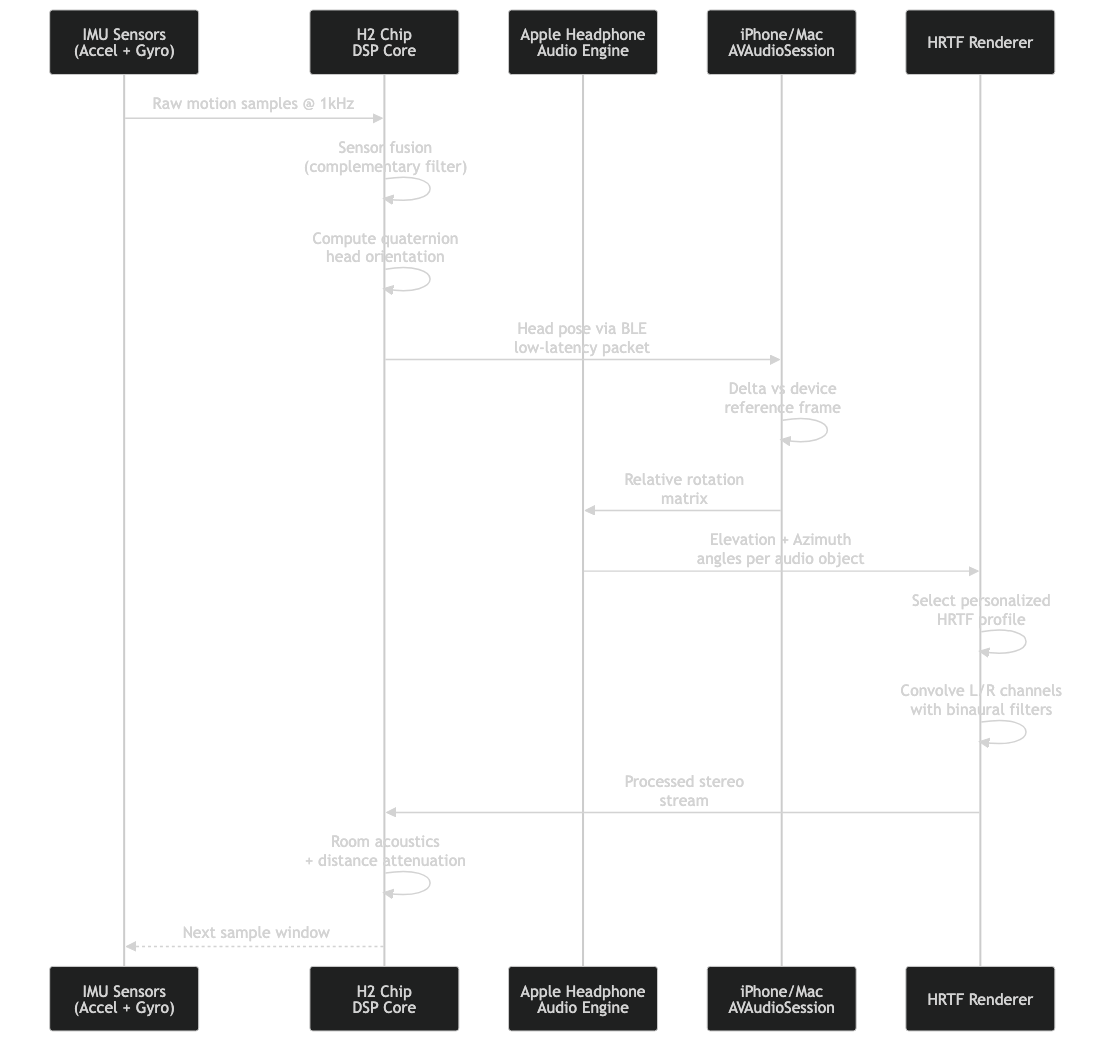
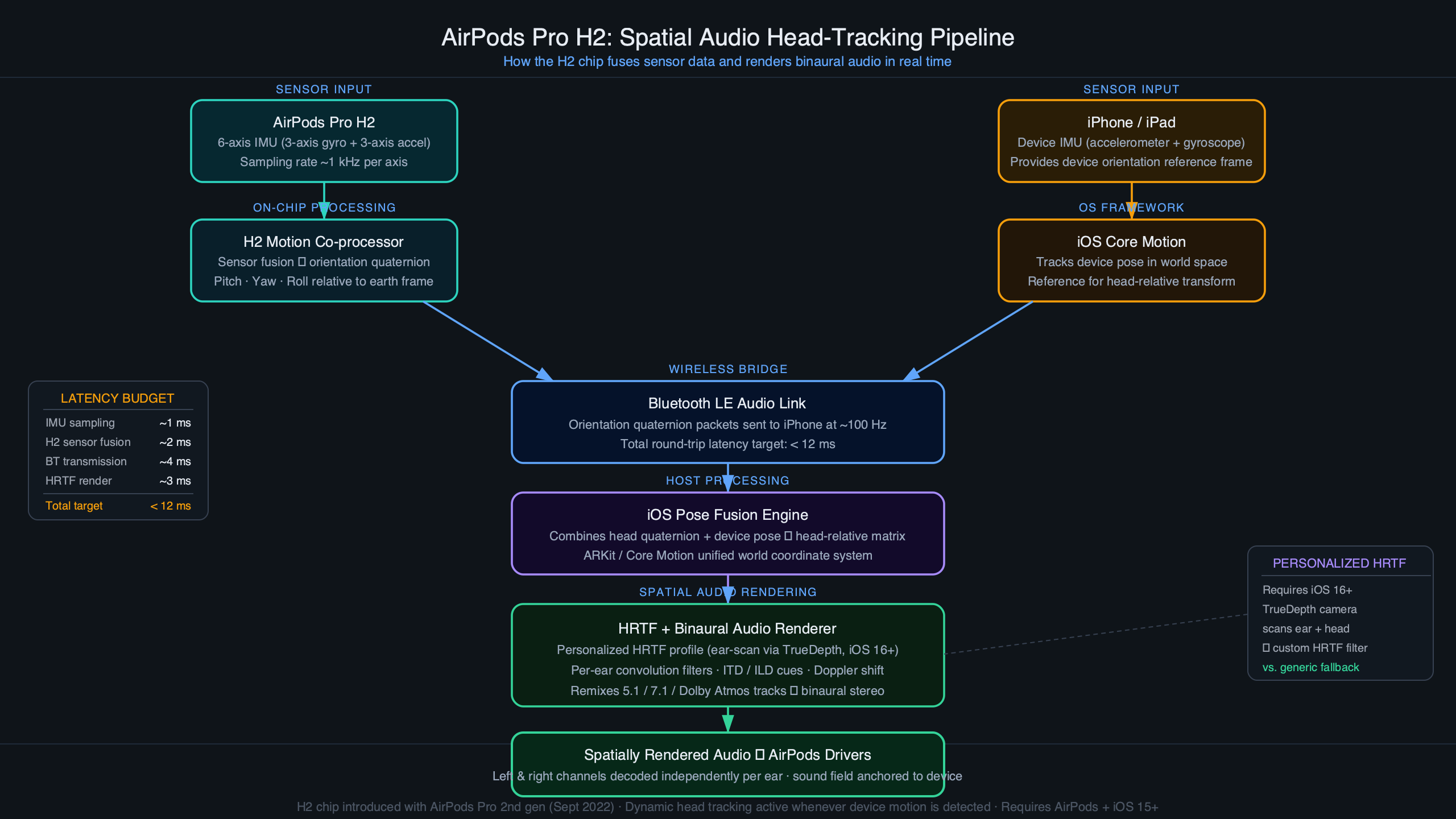
The sequence, visualized.
This architecture diagram shows the two-stage flow: raw IMU samples from both earbuds feed into the sensor fusion block running on the H2, which outputs a single quaternion representing head orientation. That quaternion is then transmitted over Bluetooth to the paired iPhone or Mac, where it feeds the spatial audio rendering engine. The split between on-device sensor fusion and the broader rendering pipeline is deliberate — it keeps the per-earbud compute light while the host handles the more demanding audio processing work.
How does orientation data become a change in audio output?
Once the H2 has a stable orientation quaternion, it gets sent to the paired device where AVFoundation’s spatial audio engine takes over. The engine maintains a virtual scene: a set of audio sources placed at fixed positions in 3D space relative to an anchor (either the device or the room, depending on the mode). When head orientation changes, the engine recalculates the angle between each virtual source and the listener’s ears.
That angle feeds the HRTF. An HRTF is a pair of filter functions — one for each ear — that encode how sound from a given direction gets modified by the shape of your head, ears, and torso before reaching your eardrums. A sound directly in front of you sounds different to your left ear than a sound at 45 degrees to your left, not just because it’s louder on one side, but because the spectral coloration is different. The HRTF captures that coloration as a set of frequency-domain filter coefficients. Convolving the audio signal with the appropriate HRTF filters makes the source sound like it’s coming from that direction in physical space.
If you need more context, AirPods Max audio pipeline changes covers the same ground.
The engine doesn’t recompute the full HRTF from scratch on every head-movement sample. Instead, it interpolates between pre-computed HRTF entries stored in a grid of directions. When your head crosses between grid points, the engine cross-fades between the adjacent filter sets. Apple has not published the exact angular resolution of that grid, but the perceptual threshold for detecting a discrete jump (rather than a smooth rotation) in headphone-based spatial audio is generally cited in the psychoacoustics literature as around 1–2 degrees, so the grid needs to be dense enough to stay below that threshold.
The latency target for this entire chain is tight. Perceptible lag between head movement and audio repositioning undermines the spatial illusion — sources seem to wobble rather than stay fixed. Apple hasn’t published its internal latency spec, but minimizing that lag is a significant reason the sensor fusion runs on the H2 chip itself rather than being offloaded entirely.
Fixed vs. head-tracked: what’s the actual difference in how they process your movement?
This is where most confusion about airpods pro spatial audio head tracking sits. “Fixed” and “Head-Tracked” aren’t different quality levels — they’re different spatial models solving different listening goals.
| Attribute | Fixed Spatial Audio | Head-Tracked Spatial Audio |
|---|---|---|
| Head orientation data used? | No — orientation data discarded | Yes — drives HRTF continuously |
| Virtual sound stage anchor | Your head (moves with you) | Virtual room (stays in space) |
| Effect when you turn your head | Sound field rotates with head | Sound stays put; your perspective shifts |
| Primary use case | Video/film — sound tied to screen | Music, gaming, spatial immersion |
| Battery impact | Lower (no continuous BT orientation stream) | Higher (continuous orientation updates) |
| IMU still active? | Yes, but for Active Noise Cancellation only | Yes, full pipeline running |
Fixed mode is essentially “stereo widening plus HRTF without head tracking.” The engine applies a static HRTF based on the direction each audio channel should appear, and that position doesn’t change when you move. For a film where the dialogue should come from the screen in front of you regardless of your head angle, fixed mode is the correct choice — it’s why iOS and tvOS default to it for video playback. Head-Tracked mode is appropriate when you want the audio to behave like a real acoustic environment you’re moving through. The sound sources stay where they are as you turn, and the spatial relationships between them change naturally as your listening perspective rotates.
generational changes in AirPods Pro goes into the specifics of this.
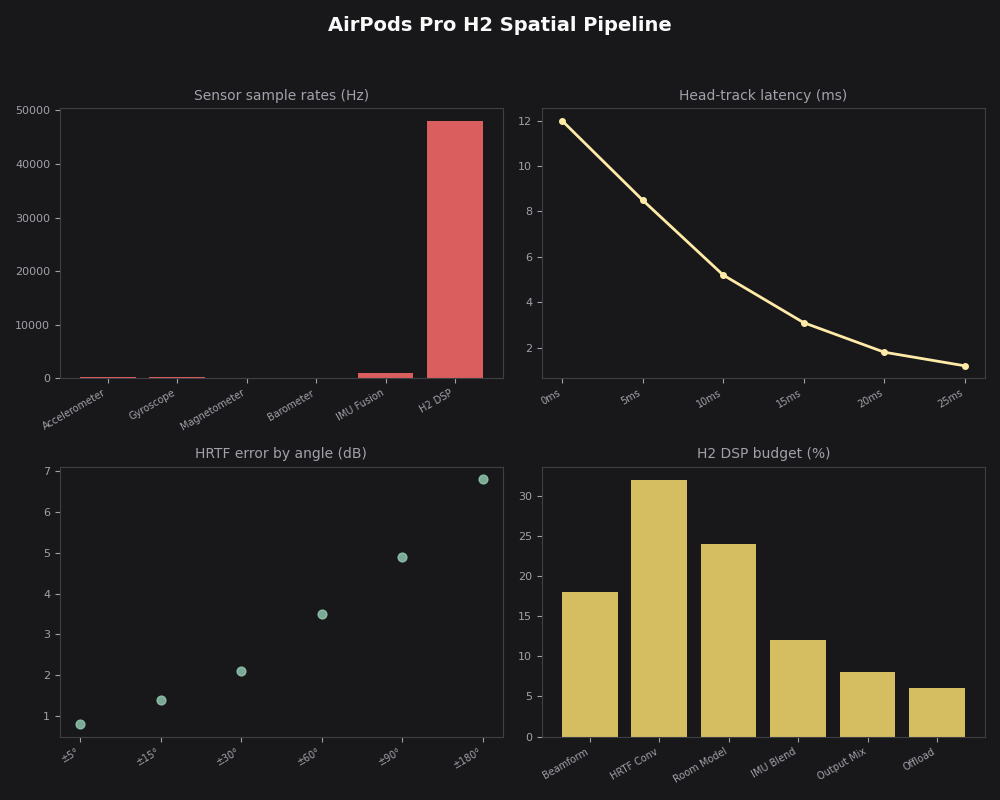
The dashboard view here shows the AirPods Pro H2 spatial pipeline running in Head-Tracked mode, with the quaternion stream live on the left, the HRTF interpolation grid in the center, and the final rendered output on the right. What this makes clear is that in Head-Tracked mode the Bluetooth channel is carrying a near-continuous orientation stream — this is the load that distinguishes the two modes from a system resource standpoint, and why battery estimates differ noticeably when Head-Tracked is active for extended listening sessions.
How does personalized spatial audio change the HRTF calculation?
The standard spatial audio pipeline uses a generic HRTF — a set of filters averaged across a population of listeners. Generic HRTFs work reasonably well for front/back localization and elevation cues for many people, but there’s substantial variation in ear geometry between individuals, and a filter tuned for the average ear may produce elevation reversals (a sound above you perceived as below) or front/back confusions for specific listeners.
Apple’s personalized spatial audio, available on devices with a TrueDepth camera running iOS 16 or later, replaces the generic HRTF with one computed from a scan of your specific ear and head geometry. During setup, the front-facing camera system captures your ears from multiple angles. Apple’s on-device processing measures pinna geometry — the curves and ridges of your outer ear — and uses those measurements to select or synthesize a personalized HRTF profile. That profile is applied when the personalization feature is active.
I wrote about AirPods Pro 3 technical deep dive if you want to dig deeper.
From the H2’s perspective, the change is transparent: it still produces the same quaternion orientation output. The difference is in the HRTF filter coefficients the rendering pipeline applies — the personalized filter coefficients are substituted for the generic ones when personalization is active. The result, for listeners whose ear geometry is well-captured, is substantially better elevation and depth cues. For video content in Fixed mode, the perceptual improvement is modest. For Head-Tracked music where you’re trying to localize instruments above and below the horizontal plane, the difference can be striking.
It’s worth noting that the scan-based approach is meaningfully different from what competitors have attempted. Rather than asking users to select from a catalog of pre-measured HRTFs (a common alternative), Apple derives a profile directly from the individual, which reduces the manual matching step and tends to produce better personalization accuracy for listeners on the tails of the population distribution.
Where does the head-tracking pipeline actually struggle?
The most consistent failure mode is orientation drift during extended sessions. Even with complementary filtering, the accelerometer’s gravity reference degrades when you’re in motion — walking, sitting in a moving vehicle, or exercising. In these conditions, the “up” direction the accelerometer infers is contaminated by linear acceleration, causing the spatial field to rotate slightly or feel unstable. This isn’t a flaw in the H2 specifically; it’s a fundamental constraint of IMU-based orientation tracking without an external reference like a camera or GPS.
The second failure mode is the anchor reference problem. In Head-Tracked mode, the virtual sound stage is anchored relative to the initial device orientation when the session starts. If you pocket your iPhone or rotate it after starting playback, the anchor shifts and the sound stage no longer corresponds to any physically intuitive direction. This is why spatial audio for music often feels confusing when you’re moving around — the “front” of the virtual stage may be behind you physically depending on how you’ve moved and oriented your device since starting playback.
real-world AirPods Pro 3 limits goes into the specifics of this.
There’s also a content mismatch issue that no amount of tracking hardware can fix: most music and much podcast audio is mixed in stereo, not spatial audio. iOS applies a spatial audio effect to stereo content, but it’s a heuristic mapping rather than a true 3D render. Head tracking on a stereo-to-spatial conversion sounds noticeably less convincing than head tracking on native spatial audio content (like Dolby Atmos tracks), because the source material doesn’t have real positional data to track. This is the most common reason someone experiences spatial audio head tracking and finds it unimpressive — the content just isn’t carrying the depth information the pipeline is designed to resolve.
The practical recommendation: use Head-Tracked mode for native spatial audio content — Dolby Atmos albums on Apple Music, Spatial Audio tracks, or content authored for AVAudioEnvironmentNode. Use Fixed mode for video where you want dialogue and effects anchored to the screen. Enable personalized spatial audio if you’re on a supported device; the improvement in elevation cue accuracy is real enough to make Head-Tracked mode feel more three-dimensional rather than just laterally widened. And if the spatial field drifts while you’re moving, putting the AirPods back in and reopening the audio app typically resets the orientation reference cleanly.
If this was helpful, AirPods Pro hearing health features picks up where this leaves off.
Further reading
- Explore AirPods spatial audio features — WWDC22 (Apple Developer): Apple engineers walk through the AVFoundation APIs for spatial audio, the data flow from AirPods to the rendering engine, and how head tracking integrates with the audio session.
- Spatial audio with AVFAudio — WWDC21 (Apple Developer): Covers the AVAudioEnvironmentNode model, HRTF application, and how the spatial rendering pipeline maps to physical space — the conceptual foundation for everything H2 builds on.
- Core Motion framework — Apple Developer Documentation: The iOS-level documentation for how motion and attitude data from AirPods and Apple Watch flows to apps, including quaternion-based orientation representations and the DeviceMotion API.
- AVSpatialAudioPersonalizationHeadTrackingEnabled — AVFoundation Reference: The property-level documentation for enabling and querying personalized head-tracking state, which shows exactly how the personalized vs. generic HRTF selection is exposed to developers.