
My phone buzzed for the fourth time in three minutes. Some AI summary of an email I didn’t need to read yet. Then a “memory” notification from three years ago. Then a suggestion to order coffee because it was 10:15 AM. I looked at the screen, currently pausing my music to tell me about a flash sale on socks, and I finally snapped.
I threw the phone in a drawer.
This isn’t a “digital detox” post. I’m not quitting the internet. I need it for work. But when it comes to music? I’m done with the algorithm. I’m done with “Smart Shuffle” inserting podcast clips into my focus playlist. I’m done with renting my library.
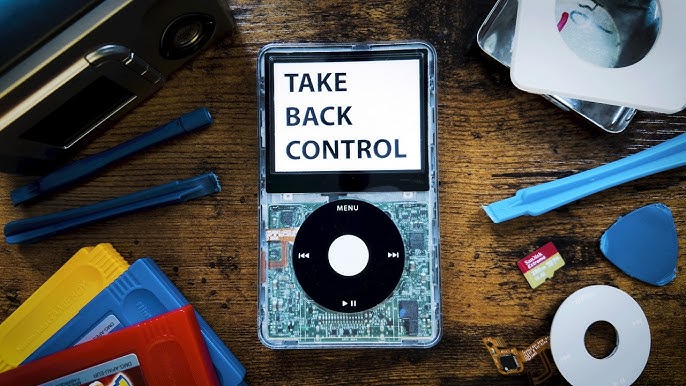
So, last Tuesday, I did what apparently half the internet is doing right now. I bought a dirty, scratched-up 5.5 Generation iPod Video on eBay. It cost me $145—which is insane considering these things were $40 in 2020—but here we are. The listing said “broken hard drive, battery dead.”
Perfect.
The Hardware Reality Check
Let’s be real: nostalgia is a liar. We remember these devices being perfect, but they weren’t. Mechanical hard drives are fragile. The batteries lasted maybe eight hours if you were lucky. The screens scratched if you looked at them wrong.
But in 2026, the iPod isn’t about what it was. It’s about what you can turn it into.
I ordered a pile of parts from iFlash and a few sketchy sellers on AliExpress. Here’s the build list I settled on after reading way too many forum threads at 2 AM:
- Base: iPod Video 5.5 Gen (The “Wolfson DAC” one—we’ll get to that)
- Storage: iFlash-Quad adapter with four 512GB Samsung Evo Select cards (2TB total)
- Power: 3000mAh “square” battery mod
- Shell: A transparent atomic purple faceplate because I have zero taste
- Connectivity: A USB-C mod board (soldering required)
Opening this thing was a humbling experience. Modern tech is glued shut; old tech is clipped shut with plastic tabs that hate you. I broke two spudgers and sliced my thumb trying to wedge the case open. When it finally popped, it sounded like a gunshot. But once you’re in? It’s glorious. No soldered RAM. No proprietary screws preventing access. Just ribbons and connectors.
The 2TB Problem
Here’s something the guides don’t tell you: iTunes (or the “Apple Devices” app on Windows 12) freaks out when you hand it 2TB of storage on a device from 2006. It just crashes. The RAM on the iPod’s mainboard—a measly 64MB on the 80GB model—can barely index the database limit of the stock OS.
I spent six hours trying to sync my FLAC library. It failed at track 14,000 every single time. Error -50. Error -69. The classics.
The solution? Rockbox.
If you haven’t used Rockbox since 2010, you need to look again. The daily builds in early 2026 have gotten surprisingly stable. I flashed the bootloader, dragged my music folder over like it was a USB drive (because it is), and rebooted.
No sync cables. No “authorizing this computer.” Just files on a disk.
I’m running a theme called “FreshOS” that makes the UI look vaguely modern, but honestly, I mostly keep the screen off. The battery life with the 3000mAh cell and flash storage is stupid. I’ve been listening for four days straight. The battery indicator hasn’t moved.
The “Wolfson DAC” Myth vs. Reality
You’ll hear audiophiles screaming about the Wolfson WM8758 chip in the 5.5 Gen. They claim it sounds “warmer” and “more analog” than the Cirrus Logic chips in the later Classic models.
Is it true? Well, maybe.
I A/B tested it against my MacBook Pro’s headphone jack using a pair of Sennheiser HD 600s. The iPod is louder. It drives the high-impedance cans better than I expected. Is it “warmer”? I don’t know. It sounds like music. It doesn’t sound compressed. It doesn’t have notification dings cutting into the bridge of the song.

That’s the real audio upgrade: Silence.
When I listen on my phone, there’s a subconscious anxiety. I’m waiting for a Slack ping. I’m tempted to check Twitter. On the iPod, I can’t do anything else. I can’t check the weather. I can’t doomscroll. I just listen to the album. Front to back. The way the artist actually intended, before the “skip rate” metrics took over.
The USB-C Soldering Nightmare
And if you decide to do this, a warning about the USB-C mod. The 30-pin connector is iconic, but finding a cable in 2026 is annoying. I wanted to charge this thing with the same cable as my laptop.
The mod kit I bought required desoldering the original 30-pin port. This is not for beginners. The pins are microscopic. I had my soldering iron set to 350°C, lots of flux, and I still almost lifted a pad on the logic board. If you don’t have a microscope or at least a really good magnifying glass, just stick with the 30-pin cable. It’s not worth bricking a $150 logic board just to save carrying an extra wire.
But when I plugged in that USB-C cable and saw the charging icon light up? I felt like a wizard.
Why We’re Mending Things
There’s a reason repair cafes are packed right now. We’re tired of renting hardware. We’re tired of “Terms of Service” updates that disable features we paid for.
Fixing this iPod wasn’t just about getting a music player. It was about ownership. I replaced the battery. I upgraded the drive. If the headphone jack fails next year, I have a spare in my drawer. I don’t need a Genius Bar appointment. I don’t need AppleCare.
It’s messy. My atomic purple case doesn’t fit quite flush at the bottom because I routed the battery cable poorly. The click wheel is a little stiffer than the original. It’s not a “seamless” experience.
But it’s mine.
And just yesterday, I sat on the subway. No service. My phone was a brick. Everyone else was staring at blank screens or frantically refreshing feeds. I spun the click wheel, scrolled down to “Radiohead,” and hit play. The hard drive didn’t spin up—because there isn’t one anymore—but the music started instantly.
Sometimes the future is just fixing the past.
Frequently asked questions
How much does a used 5.5 generation iPod Video cost on eBay in 2026?
A scratched, non-working 5.5 Generation iPod Video with a broken hard drive and dead battery sold for $145 on eBay. That price is striking considering the same devices went for around $40 in 2020. The surge reflects growing demand as people modify these players into modern music devices, replacing the fragile mechanical drives and worn batteries with flash storage and higher-capacity cells.
Why does iTunes crash when syncing 2TB of storage to an old iPod?
The iPod’s mainboard has only 64MB of RAM on the 80GB model, which can barely handle the stock OS database limits. When iTunes or the Apple Devices app on Windows 12 tries indexing 2TB of music, it crashes, typically failing around track 14,000 with errors like -50 or -69. Installing Rockbox bypasses this by letting you drag files over like a USB drive.
Is the Wolfson DAC in the iPod 5.5 really better than later Classic models?
Audiophiles claim the Wolfson WM8758 chip sounds warmer and more analog than the Cirrus Logic chips in later Classics. In an A/B test against a MacBook Pro headphone jack using Sennheiser HD 600s, the iPod was louder and drove high-impedance headphones well. Whether it’s truly warmer is uncertain, but it sounds uncompressed and, crucially, free of notification interruptions cutting into songs.
What parts do you need to mod an iPod Video with flash storage and USB-C?
The build uses an iPod Video 5.5 Gen as the base, an iFlash-Quad adapter loaded with four 512GB Samsung Evo Select cards for 2TB total, a 3000mAh square battery mod, a transparent faceplate, and a USB-C mod board requiring soldering. The USB-C conversion involves desoldering the original 30-pin port, which demands a microscope, flux, and a soldering iron set to 350°C.