
I have a confession: I haven’t rebooted my MacBook in three weeks. I know, I know. It’s bad practice. The memory leaks are probably piling up like dirty laundry, and WindowServer is eating more RAM than Chrome on a bad day. But I just can’t bring myself to do it.
Why? Because getting my workspace back to exactly how I like it takes ten minutes I don’t want to spend.
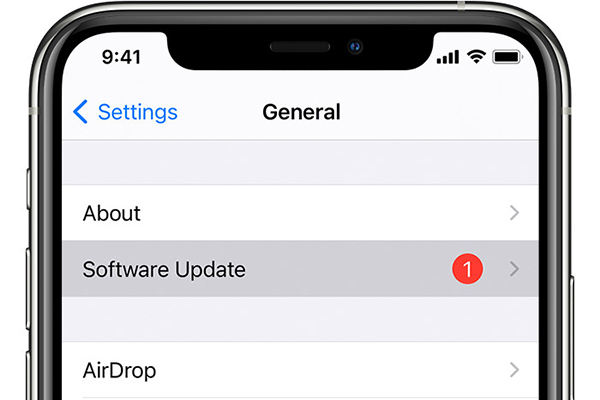
That’s why the latest change in the iOS 26.3 and macOS Tahoe 26.3 betas caught my eye immediately. It’s not the flashy AI stuff or the UI tweaks. It’s a boring little toggle in the Software Update settings called Background Security Updates.
If this does what I think it does, we might finally be done with the “restart required” tyranny for minor patches.
The Evolution of “Please Wait…”
Remember when Apple introduced Rapid Security Response (RSR) a few years back? That was supposed to be the fix. The idea was solid: ship small security patches between major point releases so we didn’t have to download a 4GB file just to patch a WebKit vulnerability.
It was better, sure. But it wasn’t perfect. You still usually had to restart the device to apply the changes. It was a quicker restart, but a restart nonetheless. Your phone went black, the Apple logo mocked you for a minute, and you lost your place in whatever article you were reading.
This new “Background Security Updates” feature in the 26.3 beta seems to be the next logical step. Live patching.
Linux servers have done this for ages. You can patch a kernel or a library in memory without bringing the whole system down. It’s magic. And it looks like Apple is finally confident enough in their architecture to bring something similar to the iPhone and Mac.
What I’m Seeing in the Beta

I installed the iOS 26.3 developer beta on my daily driver (yes, I live dangerously) to see how this actually behaves.
The toggle sits right under the Automatic Updates section. The description is vague—classic Apple—but the behavior is interesting. Yesterday, a small security definition file pushed through. Usually, this would trigger a prompt.
This time? Nothing.
I wouldn’t have even known it happened if I hadn’t checked the build number in the About screen. The system just… absorbed the update. No spinning gear. No progress bar. Just the new security version string quietly updating itself while I was doom-scrolling Twitter.
This suggests Apple is moving toward userspace patching. If a vulnerability is in an app framework or a system library that isn’t the kernel itself, they can likely swap out the code in memory, kill the old process, and spawn a new one without the user noticing anything more than a micro-stutter.
Why macOS Tahoe Needs This More
On an iPhone, a reboot is annoying. On a Mac, it’s a productivity killer.
I’m testing macOS Tahoe 26.3 on my M4 Pro, and the implications here are massive for uptime. Mac users are notorious for ignoring update notifications because we have 40 terminal windows open and unsaved Photoshop projects. We hit “Remind Me Tomorrow” until “Tomorrow” becomes “Next Month.”
That’s a security nightmare.
By decoupling security fixes from the reboot cycle, Apple removes the friction. If they can patch a critical Safari exploit in the background while I’m working, without forcing me to close my IDE, that’s a win. It means I’m actually going to run the patch, rather than putting it off because I’m “too busy.”
The Trust Problem

Here is the flip side, though. And it’s a big one.
If updates happen silently in the background, what happens when they break something? We’ve all been burned by a bad update. Maybe it drains the battery. Maybe it breaks Wi-Fi connectivity. Maybe it makes Bluetooth act like it’s drunk.
With the old model, you made a conscious choice to click “Install.” You accepted the risk. You could wait a few days to see if Reddit exploded with complaints before taking the plunge.
If “Background Security Updates” is on by default—and I suspect it will be for the general public eventually—you lose that control. You might wake up one morning to a phone that’s overheating because a silent background patch introduced a loop in a system process.
I dug around the settings, and thankfully, you can toggle it off. But most normal people won’t. They’ll just experience the bugs and blame the hardware.
So, Should You Use It?
Right now, we are still in the beta phase. January is always a weird time for iOS cycles; the .3 releases are usually stable, but adding a new update mechanism is risky.
I’m leaving it on.
The convenience of not staring at a progress bar outweighs the fear of a bad patch for me personally. Plus, the security landscape in 2026 is aggressive. Zero-day exploits are being sold and used faster than ever. The gap between “exploit discovered” and “exploit used in the wild” is practically zero.
Waiting three days to reboot your phone because it’s inconvenient? That’s a luxury we don’t really have anymore.
If Apple can pull this off—truly silent, reboot-free security patching—it fixes the biggest vulnerability in the ecosystem: human laziness.
Just don’t blame me if your alarm doesn’t go off tomorrow morning because a background patch crashed the clock daemon. That’s the price of living on the edge.
Frequently asked questions
What is Background Security Updates in iOS 26.3 and macOS Tahoe 26.3?
Background Security Updates is a new toggle in the Software Update settings of the iOS 26.3 and macOS Tahoe 26.3 betas that applies minor security patches silently without requiring a restart. It appears to use live, in-memory patching for userspace frameworks and libraries, quietly updating the security version string while you continue working, rather than triggering the usual prompt and reboot cycle.
How is Background Security Updates different from Apple’s Rapid Security Response?
Rapid Security Response shipped small patches between major point releases so users didn’t need a 4GB download to fix a WebKit flaw, but it still typically required a restart. Background Security Updates goes further by applying patches in memory without any reboot. The system absorbs the update, killing and respawning affected processes with at most a micro-stutter, rather than showing a progress bar or Apple logo.
Can you turn off Background Security Updates on iOS 26.3?
The author confirms that after digging through the settings, the Background Security Updates feature can be toggled off. It sits right under the Automatic Updates section in Software Update. However, the article suspects it will eventually be on by default for the general public, meaning most users will not disable it and will simply live with whatever silent patches Apple pushes.
What are the risks of silent background security patches on iPhone?
Silent patches remove the conscious “Install” decision, so users can’t wait a few days to see if Reddit reports problems before updating. A bad background patch could drain battery, break Wi-Fi or Bluetooth, or introduce a loop in a system process that causes overheating. The article warns a crashed clock daemon could even stop your alarm from going off, and average users will blame the hardware instead.