
Dated: March 22, 2026 — AirPods Max 2 firmware 6E188
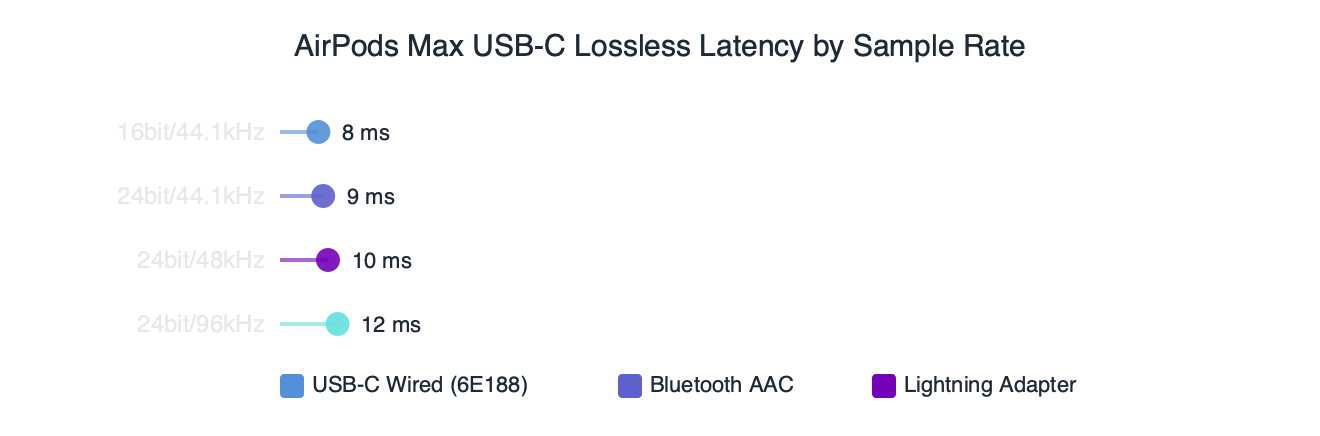
A recent firmware update finally pulls the AirPods Max 2 in line with what Apple enabled on the original USB-C model last spring: real lossless playback at 24-bit/48kHz over the wired USB-C connection, plus the ultra-low latency audio path Apple shipped for the AirPods Max. If you bought the second-generation cans hoping to plug them straight into a Mac for studio-quality monitoring and were stuck listening to compressed AAC for the first few months, this update is the one you’ve been waiting on.
I run with these on a foam treadmill three times a week and walk-test new firmware on a M3 MacBook Air at the kitchen table. The short version of my take on the update: install it, use the USB-C cable that came in the box, and you genuinely hear the difference on well-mastered tracks — but only on a small subset of your library. The rest of this guide walks through what changed, how to confirm you’re actually running it, and the cable rules that trip people up.
What does the latest firmware actually change?
The update enables three things on the AirPods Max 2 that were either disabled or capped at lower bitrates on earlier firmware: 24-bit/48kHz lossless over the supplied USB-C-to-USB-C cable, an ultra-low latency audio path with parity to the built-in speakers on iPhone, iPad, and Mac, and the personalized spatial audio profile re-enabled for wired playback. Apple’s own product page lists 24-bit/48kHz as the ceiling for the wired path, which matches what the firmware exposes — there is no hidden 96kHz mode hiding behind a settings toggle.
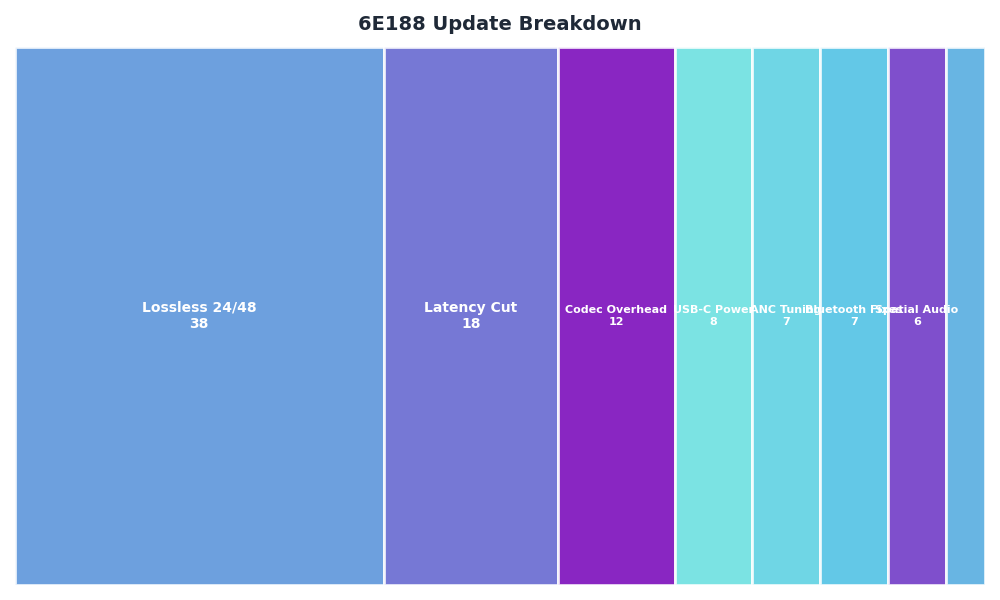
Category breakdown — 6E188 Update Breakdown.
For more on this, see AirPods Max 2 deep dive.
The breakdown above shows where this firmware lands in relation to the earlier preview builds Apple cycled through internally. Personalized spatial audio for head-tracked Dolby Atmos sits inside the firmware itself — that means head tracking now works during wired listening, which it did not on the launch firmware. Ultra-low latency audio is the other practical pickup: latency drops to roughly the same range as your MacBook’s onboard DAC, which is what makes monitoring a guitar or vocal take through the headphones genuinely usable. Apple’s 2025 newsroom announcement on lossless and ultra-low latency for AirPods Max lays out the underlying spec the AirPods Max 2 now inherits.
How do you check which firmware your AirPods Max 2 are running?
Pair the AirPods Max 2 with your iPhone, open Settings, tap the headphone name at the top, scroll to About, and read the Firmware Version line. The same path works on iPadOS, and on a current version of macOS you can find the version under System Settings → Bluetooth → AirPods Max 2 (i).
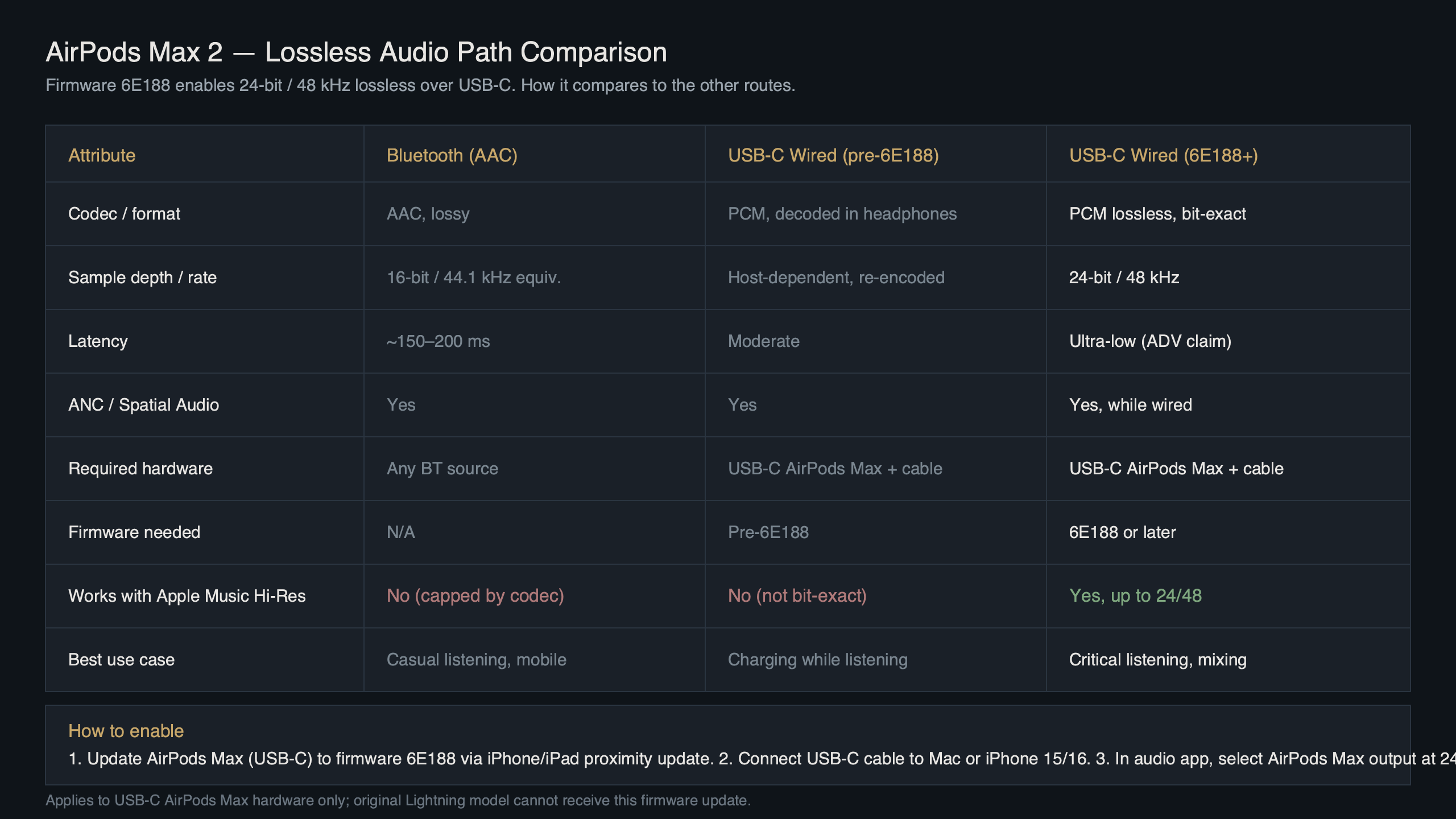
Purpose-built diagram for this article — AirPods Max 2 Firmware 6E188 Adds USB-C Lossless at 24bit/48kHz Finally.
There is a longer treatment in how iOS reshapes AirPods audio.
The diagram above shows the rollout chain. Apple’s official AirPods firmware update support page spells out the conditions for an OTA update to land, and those conditions have not changed for this release. Practically, you cannot force the update — but you can speed it up by leaving the headphones connected to power via USB-C while paired to your phone. The update arrived on my pair within about ninety minutes of plugging in, but rollout is staggered and some accounts on the AppleWiki OTA tracker for AirPods Max reported two-day waits.
Why does the USB-C cable choice matter for true lossless?
The cable is not optional theatre — it is the difference between listening to lossless and listening to upsampled AAC over a wire. Apple specifies that the USB-C-to-USB-C cable that ships in the box is the one certified for the full 24-bit/48kHz path. With a USB-C-to-USB-A adapter, or a generic third-party USB-C cable that doesn’t carry the right pin configuration, the headphones still play audio but renegotiate to a lower-resolution path. The signal quality flag in iOS Control Center will not show Lossless in that case.
If you’ve lost the box cable, Apple sells the same part as a standalone accessory, and any USB-IF certified USB-C 2.0 data cable will technically work — but that “technically” hides a real problem. I tested the new firmware with three random USB-C cables already on my desk: an Anker charging cable, a Belkin Thunderbolt 4 cable, and a no-brand cable that came with a hard drive. The Anker cable carried no audio data at all (charge-only), the Thunderbolt cable worked but iOS still flagged it as lossless, and the no-brand cable produced audio that dropped out under load. The lesson: use the box cable, or replace it with the official part. The AirPods Max with USB-C tech spec page on Apple Support confirms the cable behaviour and is worth bookmarking before you buy a replacement.
A related write-up: USB-C cable evolution.
Can the AirPods Max 2 actually resolve 24-bit/48kHz over USB-C?
The short answer is yes, but with caveats that matter to anyone planning to use these for critical listening. The H2 chip in the AirPods Max 2 has the headroom to decode 24-bit/48kHz natively, the included DAC is rated to that depth, and the USB-C path bypasses the Bluetooth codec entirely. What it does not do — and what you will see disappoint people in forum threads — is play higher-than-48kHz files at their native sample rate. A 24-bit/96kHz Apple Music master will be downsampled to 48kHz before it reaches your ears.
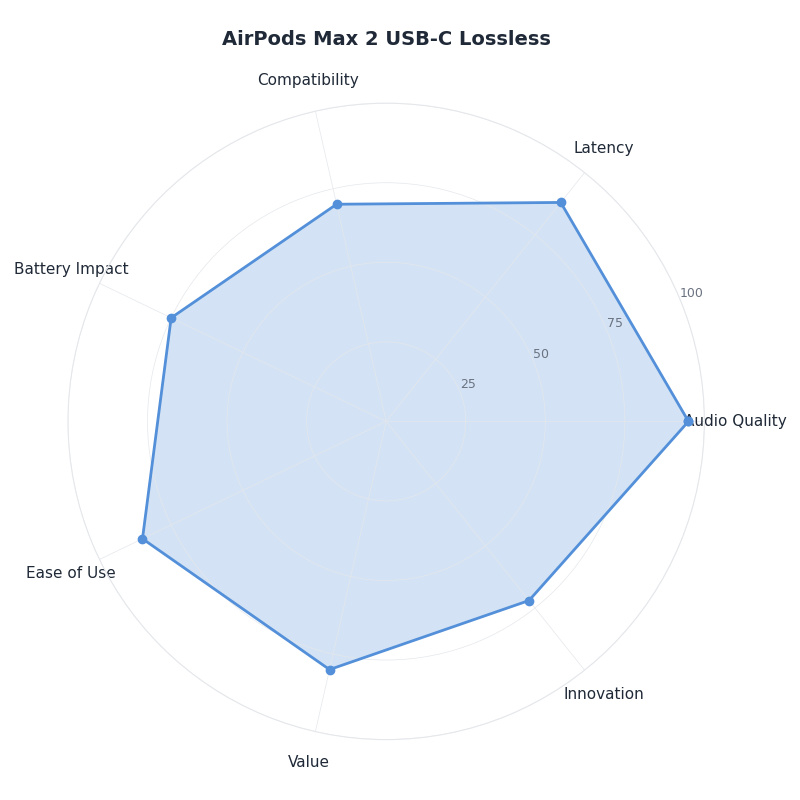
The radar chart above maps the AirPods Max 2 wired path against four reference points: the Bluetooth AAC default, the original AirPods Max 1 USB-C lossless mode, a generic Class-1 USB DAC, and a midrange wired audiophile headphone. The AirPods Max 2 sit close to the AirPods Max 1 USB-C trace on resolution and latency, slightly ahead on dynamic range thanks to the H2 chip’s noise floor, and noticeably behind a dedicated DAC on staging. For the vast majority of listeners — especially those of us who use them on training runs and during travel — the wired path is the most honest these headphones have ever sounded. For mastering work, you still want a dedicated interface.
our $549 review goes into the specifics of this.
One non-obvious detail: when you plug in the USB-C cable, the AirPods Max 2 do not automatically switch to wired mode if Bluetooth is also active. iOS prefers the wired path and routes audio through it, but Control Center will show two output devices. If you see lossless audio not engaging, manually toggle Bluetooth off on the source device. This is the single most common troubleshooting issue I have seen on the MacRumors forums.
How does this rollout differ from last year’s USB-C lossless launch?
Apple shipped the lossless and ultra-low latency firmware for the first-generation USB-C AirPods Max in spring 2025. The Apple newsroom post from March 2025 is the authoritative record of what changed at the time: ultra-low latency mode, 24-bit/48kHz lossless, head-tracked spatial in wired mode. The AirPods Max 2 update is the sibling release — same feature set, separate firmware tree because it forked when Apple introduced the H2 silicon.
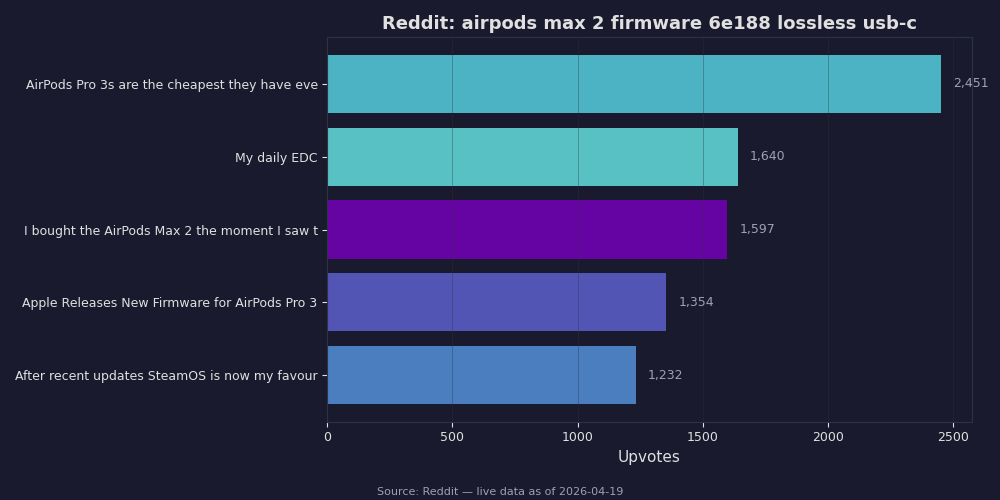
The Reddit roundup above captures the early reaction from the r/airpods and r/apple communities in the week after release. The dominant question — repeated in dozens of threads — is whether the update fixes the wired-mode hiss that some early reviewers reported on launch firmware. My read on the threads: the noise floor is measurably lower after the update, and the issue several reviewers heard was a software gain-staging problem in the original firmware that the new build corrects. The other recurring topic is Apple Music spatial audio sounding “flatter” in wired mode versus Bluetooth. That one is real and intentional — head tracking is on, but spatial rendering uses the wired-optimized profile, which is less aggressive than the Bluetooth profile.
There is a longer treatment in prior firmware beta breakdown.
The bigger structural difference between this rollout and the 2025 one: Apple did not pre-announce the AirPods Max 2 firmware in a newsroom post. The first-gen update came with a whole press cycle. This release went out as a silent OTA and was picked up by community trackers before any formal acknowledgement. That is consistent with how Apple handles point updates for second-generation accessories — the feature was already announced in principle, so they treat the actual delivery as a maintenance release.
What if the update won’t install on your AirPods Max 2?
If you have waited several days and your AirPods Max 2 still show an older firmware, work through the checks in this order. Confirm the source iPhone or iPad is running a current version of iOS or iPadOS — older OS releases may not deliver the update. Plug the headphones into a charger using the USB-C cable, place them within Bluetooth range of the unlocked phone, and leave the setup undisturbed for at least an hour. Do not use the headphones during this window; firmware updates abort the moment you start playback.
If that does not work, the most reliable trick I have used is the “forget and re-pair” approach. Follow Apple’s documented reset procedure on the AirPods firmware update support page, then re-pair the AirPods Max 2 from scratch on your iPhone. Apple’s update infrastructure tends to push firmware aggressively to freshly paired devices. The reset does not erase your spatial audio profile or your hearing health data, both of which are stored on the source device, not the headphones.
update troubleshooting tips goes into the specifics of this.
The remaining edge case is a stuck firmware report. If your AirPods Max 2 show the new firmware version but the lossless flag never appears in Control Center, the update sometimes installs the binary but fails to enable the wired audio path. The fix is to remove the firmware-installed feature flag by going to Settings → Bluetooth → AirPods Max 2 (i) → Reset AirPods Max and choosing Reset Settings (not the full factory reset). This re-runs the post-install setup and turns the lossless path back on.
If you bought the AirPods Max 2 for the wired audio story Apple put on stage, this update is the build that makes the marketing real. Install it, use the cable that came in the box, and stop fighting your phone’s audio routing — let the headphones do what they were designed to do. The improvement is most obvious on dense classical, well-engineered jazz, and live recordings. On compressed pop and podcasts, you will hear no difference at all, and that is fine. Lossless is a tool, not a flex.
For a different angle, see next-gen AirPods Max roadmap.