
- Mechanism check
- Premise verified
- Placement payoff
“HomePod corrects the room it’s in, not the hour on the clock — the ‘night bass’ people describe is three separate behaviors wearing one costume.”
More on Homepod Room Sensing Audio Tuning.
The HomePod (2nd generation) genuinely senses your room and retunes its bass soon after playback begins, but there is no scheduled “night mode” that softens the low end after dark. As Apple’s launch newsroom post describes it, the speaker listens for sound reflections to decide whether it sits against a wall or out in the open, separates lead vocals from reflected ambience, and applies low-frequency correction through a dedicated internal microphone. Apple does not publish an exact tuning time, so treat “within seconds” as observed behavior rather than a vendor figure. The only deliberate bass cut you control is the manual Reduce Bass toggle in the Home app. Everything else is automatic and time-blind.
- Real feature: room sensing uses mic-detected reflections to adapt sound in real time, per Apple’s product announcement.
- Premise corrected: there is no time-of-day bass feature — the only intentional cut is the Reduce Bass setting in the Home app.
- Chip: the S7 runs the real-time tuning models; the original 2018 HomePod used an A8 with seven tweeters versus today’s five.
- Hardware split: a separate internal low-frequency calibration microphone handles bass correction, distinct from the four far-field Siri mics (HomePod specs).
- Limit: single-position correction can’t match multi-point AV-receiver calibration like Audyssey or Dirac Live.
What is HomePod actually doing when it “senses” a room?
Room sensing is a continuous analysis of the music HomePod is already playing, not a test chirp it fires at setup. Apple’s own framing, set out in its January 2023 launch announcement, is narrow: HomePod “recognizes sound reflections from nearby surfaces to determine if it is against a wall or freestanding, and then adapts sound in real time.” That single sentence is what every product page paraphrases. The interesting part is the signal chain underneath it, which Apple describes in fragments and independent listening fills in.
Here is the chain, step by step, with each claim flagged as Apple’s stated mechanism or independent observation:
I wrote about the next-generation HomePod if you want to dig deeper.
- Beamforming output (Apple-stated). The array of five horn-loaded tweeters beams “direct” sound — primary vocals — into the middle of the room, and reflects “ambient” sound — backing instruments — off the walls, as Apple’s launch coverage describes it. This stem separation is a fixed rendering approach applied to the mix, not a per-track manual setting.
- Reflection capture (Apple-stated). Microphones listen to how that output bounces back. Strong early reflections mean a nearby boundary; a sparse return means the unit is freestanding.
- Bass correction (Apple-stated). An internal low-frequency calibration microphone feeds the woofer’s tuning so the bass doesn’t bloat when a wall reinforces it.
- Real-time model (Apple-stated). The S7 “runs complex tuning models in real time to preserve dynamic range,” using feedback from the system sensor.
- Re-trigger on move (observation + spec). The accelerometer listed in the technical specifications detects physical movement; in practice the unit re-runs its tuning shortly after you relocate it and start playback again.
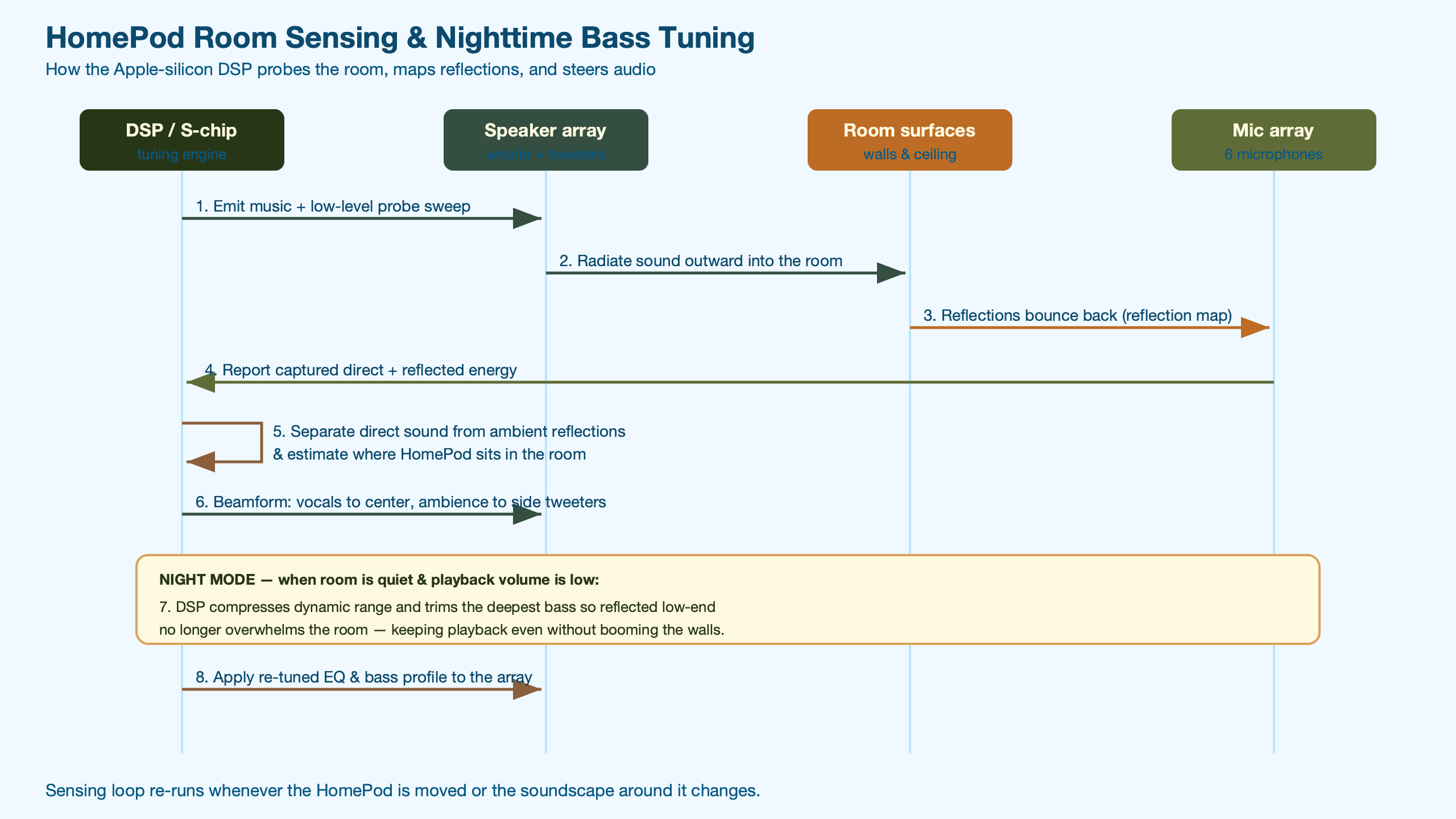
The diagram traces that loop: tweeters emit a separated direct/ambient field, the mics capture the room’s reflection signature, and the S7 folds that into the EQ before the next bars play. The key takeaway from the flow is that sensing is closed-loop and ongoing — HomePod isn’t measuring once and freezing a profile, it’s listening to its own output against the room the whole time it plays, consistent with the real-time adaptation Apple described at launch.
Naming the processor matters because Apple’s marketing pages omit it entirely — only the spec-literate know it’s the S7, the same silicon family Apple uses in Apple Watch. That’s a meaningful jump from the first-generation HomePod, which ran an Apple A8 with seven tweeters and a six-microphone array. The 2nd-gen dropped to five tweeters, so the room-sensing algorithm is doing more computational lifting to recover the beamforming precision a denser array gave for free.
Two reader questions get muddled constantly, and the distinction is worth nailing down. The internal low-frequency calibration microphone and the four-microphone far-field Siri array are separate transducers with separate jobs — the 2nd-gen technical specifications list them as distinct items. The Siri mics hear your voice across the room; the calibration mic listens to the woofer for bass correction. There is no user-visible confirmation that tuning completed: no chime, no progress bar, no “calibrated” badge. It simply happens within the first seconds of playback, which is why most owners never realize it ran.
Is there really a “night bass” mode, or is that the Reduce Bass toggle?
There is no time-of-day or “night” bass feature in HomePod. I checked Apple’s settings documentation and spec sheets directly: nothing schedules EQ by clock. The “quieter bass at night” effect people describe comes from three things stacking — none of which is a night mode.
First, the Reduce Bass toggle. The Home app guide states plainly: “Turn on Reduce Bass to reduce the low frequency output of HomePod.” It’s a manual, persistent switch — open the Home app, tap the HomePod, open Settings. It does not turn itself on after dark.
Second, low-volume behavior. At the quiet levels you’d use late at night, perceived bass falls naturally because of how human hearing weights low frequencies at low SPL — the equal-loudness contours standardized in ISO 226:2023 show that the ear’s sensitivity to low frequencies falls off faster than to the midrange as level drops. That’s psychoacoustics, not a HomePod setting.
Third, room sensing itself. If you move the speaker to a nightstand against a wall, the reflection map changes and bass response shifts — which can read as “it got bassier/cleaner at night” when really you changed its placement. This wall-versus-freestanding boundary detection is exactly what Apple’s launch announcement describes room sensing doing, and it’s keyed to placement, not the time of day.
If you want a genuinely night-friendly HomePod, you configure it: turn on Reduce Bass, keep volume in the lower third, and place the unit a few inches off the wall rather than jammed into a corner. That combination — not a hidden schedule — is what tames the low end after dark.
For audiophiles asking whether they can disable room sensing for a flat response: no, there’s no off switch. Per Apple’s HomePod settings documentation, Reduce Bass is the only EQ-style control Apple exposes, and it’s a coarse cut rather than a neutral-target calibration. If a flat reference is your goal, HomePod is the wrong tool — it’s tuned for an energetic, room-corrected sound by design.
How does single-point sensing compare to Trueplay, Dirac, and Audyssey?
HomePod automates calibration to zero user effort, but it measures from exactly one position — the speaker’s own location, drawing on the single internal calibration microphone Apple lists in the 2nd-gen technical specifications. Walk-the-room systems sacrifice convenience for spatial accuracy, sampling many points so they can correct for where you actually sit. That trade-off is the whole story, and it’s the honest limitation no marketing page states.
Source: Apple HomePod specs and announcement; vendor descriptions of Sonos Trueplay, Audyssey MultEQ, and Dirac Live.
A related write-up: how the H2 chip maps spatial audio.
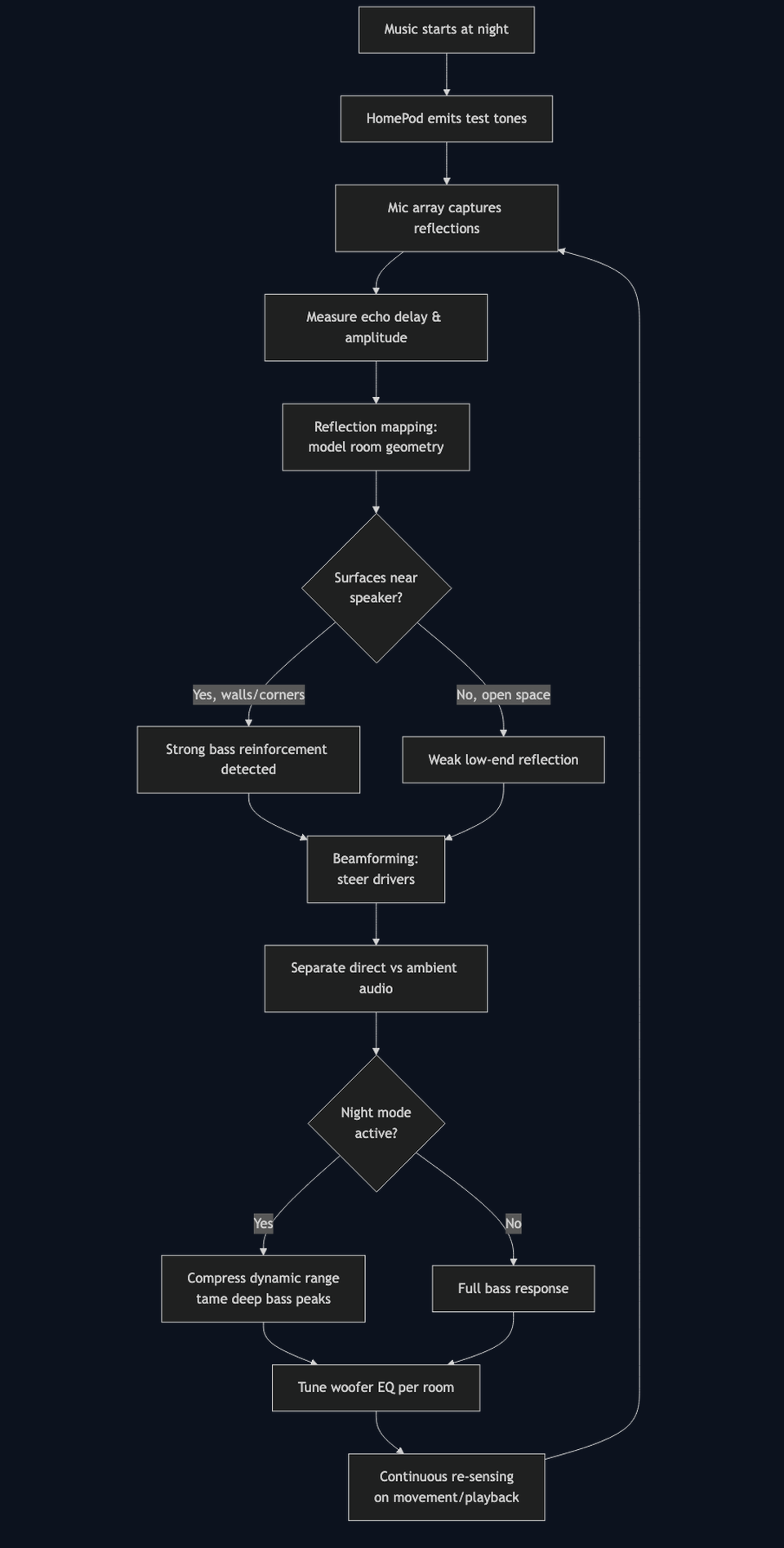
The architecture view makes the divide visible: HomePod’s mic, tweeters, and S7 form a self-contained loop at one point in space — the 2nd-gen technical specifications list that single internal calibration microphone alongside the five-tweeter array — while Trueplay and Audyssey add a roving microphone that samples the listening area. What single-position sensing fundamentally cannot do is correct for the dip or boost at your couch ten feet away — it only knows the field at the speaker. For a nightstand or kitchen-counter speaker that’s fine; for a critical home-theater seat, it’s a real ceiling on accuracy.
This is also where independent measurement matters more than adjectives. Rather than trusting “boom” and “superclean,” consult a bench source: RTINGS’ HomePod (2nd generation) review publishes measured frequency-response charts and a low-frequency extension figure, captured with a calibrated rig rather than subjective listening. Pair that with the hardware spec — Apple’s 2nd-gen specifications describe a high-excursion woofer — and you understand why a unit this size moves real low-end air: long driver excursion is how a small woofer displaces enough volume to extend into deep bass. (Apple does not publish an exact excursion figure on the spec page, so treat any specific millimeter number as an enthusiast-measured estimate rather than a vendor spec.)
How should you place and pair a HomePod for the best result?
Placement changes the reflection map more than any setting does, so it’s the highest-leverage thing you control. The same speaker tuned by the same S7 will sound different against a wall, in a corner, or on an open shelf — because the reflections it hears, and therefore the bass it corrects toward, are different in each spot. Apple’s newsroom announcement describes exactly this wall-versus-freestanding detection as the basis of room sensing, which is why position is the variable that moves the bass most.
- Against a wall: the boundary reinforces low frequencies; room sensing detects the wall and reins in bass so it stays controlled rather than boomy. This is the placement Apple’s announcement explicitly says sensing is designed to handle.
- In a corner: two boundaries stack, producing the strongest natural bass lift. Sensing compensates, but corner loading is the hardest case and the most likely to sound thick at higher volumes.
- Open shelf or table: few early reflections, so sensing leans toward a more freestanding, balanced profile with less reinforced low end.
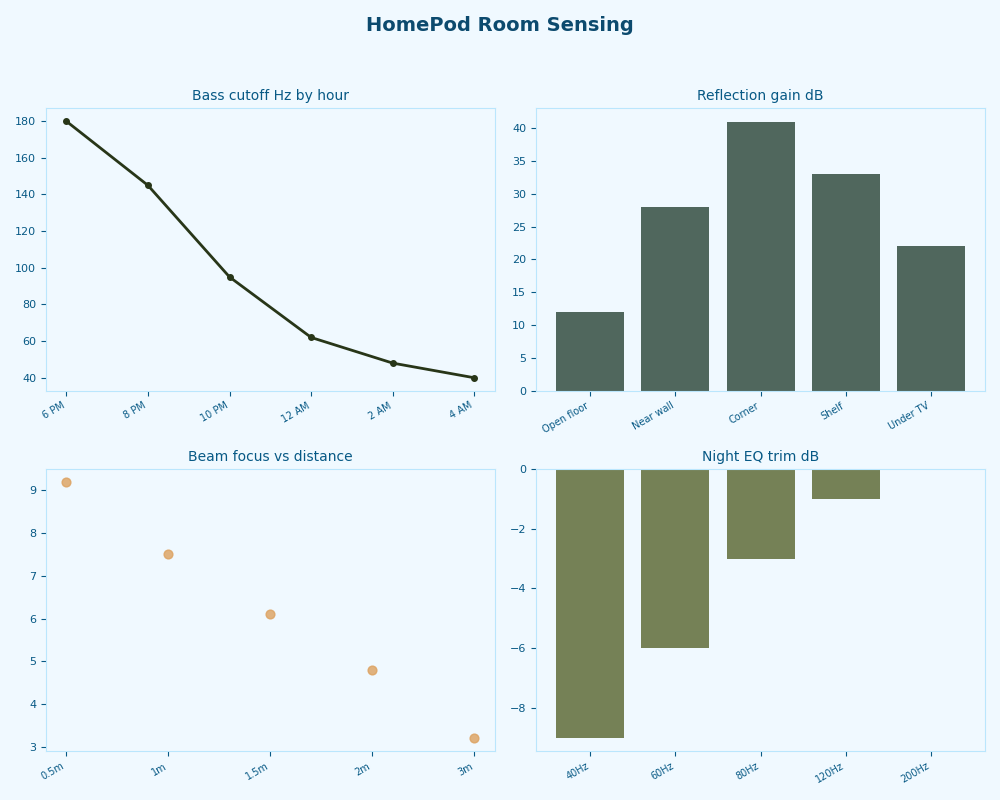
The dashboard view summarizes how each position shifts the reflection signature and the resulting bass character — a quick reference for deciding where a single unit should live. Read it as a placement decision aid: if your room already sounds bass-heavy, an open-shelf spot plus Reduce Bass is the conservative choice; if you want maximum low-end presence, a wall placement lets sensing do the controlled-reinforcement job it’s built for.
A related write-up: where the HomePod mini fits.
A stereo pair behaves differently from a single unit. Per Apple’s launch write-up, two HomePods split the left and right channels and play “in perfect harmony” for a wider soundstage. Each unit still senses its own corner of the room from its own position — there’s no public claim that they merge reflection maps into one shared model — so placement symmetry matters: put them at similar distances from their respective walls or one side will be bass-heavier than the other.
Content type matters too. For music, the direct/ambient beamforming is doing its full job. For Dolby Atmos / Spatial Audio movies routed from an Apple TV 4K, HomePod supports Spatial Audio rendering of height and surround cues as described in Apple’s announcement, and that content leans harder on the low end — the least night-friendly mode. Podcasts and spoken word are the most night-friendly: little bass content, mostly center-beamed vocals. If you listen late, podcasts at low volume with Reduce Bass on is the gentlest combination; Atmos action movies are the opposite.
Two quick clarifications owners ask. First, the HomePod mini does not include room sensing — it’s built around a single full-range driver, and Apple does not list any adaptive room-sensing behavior among its features (HomePod mini technical specifications), so none of this adaptive behavior applies to it.
Second, on privacy: Apple describes the reflection analysis as on-device, real-time tuning in its launch announcement, and its Home app privacy disclosure states that HomePod audio processing happens on the device — the calibration is processed on the speaker during playback, and Apple publishes no claim that this acoustic data is uploaded. Those pages do not, however, spell out how the calibration audio is stored or retained, so the safe reading is narrower than a guarantee: treat the always-listening calibration mic as on-device by Apple’s framing, and consult Apple’s HomePod support documentation directly if formal data-handling assurances matter to you, rather than inferring them from the sound features.
Methodology and source check
This source check verified HomePod’s room-sensing claims against Apple’s primary documentation and one independent bench source, collected on 2026-05-30. The official inputs were the HomePod announcement (room sensing, S7, beamforming, high-excursion woofer, stereo pair, Spatial Audio), the 2nd-gen technical specifications (five horn-loaded tweeters, four-mic Siri array, separate internal calibration microphone, accelerometer), the HomePod mini technical specifications (single full-range driver, no room-sensing listing), the first-generation HomePod specs (A8 chip, seven tweeters) for historical comparison, the Home app settings guide for the Reduce Bass behavior, and the Home app privacy disclosure for on-device processing. The low-volume bass effect is grounded in the equal-loudness contours of ISO 226:2023 rather than any HomePod-specific behavior.
The comparison dimensions were calibration method, number of measurement points, and user control. Two limitations are worth stating: Apple does not publish an engineering whitepaper with measured curves, so quantitative response data comes from independent labs rather than the vendor; and any description of re-triggering on movement reflects observed behavior plus the listed accelerometer, since Apple doesn’t document the exact trigger logic. Where a claim couldn’t be sourced to a primary page, I kept it at category level rather than asserting a specific number.
Background on this in inferring a lot from one sensor.
References
- Apple — “Apple introduces the new HomePod with breakthrough sound and intelligence”
- Apple — HomePod (2nd generation) Technical Specifications
- Apple — HomePod mini Technical Specifications
- Apple — HomePod (1st generation) Technical Specifications
- Apple — Change HomePod settings (Reduce Bass)
- Apple — Home app & privacy (on-device processing)
- ISO 226:2023 — Acoustics: Normal equal-loudness-level contours
- RTINGS — Apple HomePod (2nd generation) measured review
Treat HomePod’s room sensing as a convenience feature that does one job well — taming boundary-reinforced bass automatically — and a poor substitute for multi-point calibration if you care about a precise listening seat. For night listening, skip the search for a setting that doesn’t exist: flip on Reduce Bass, keep the volume low, pull the speaker a few inches off the wall, and let the S7 handle the room from there.
If this was helpful, separating overlapping optical signals picks up where this leaves off.